




Services on Demand
Journal

Article
 English (pdf)
 Article in xml format
 Article references
 Automatic translation
 Send this article by e-mail
Indicators
Related links
-
 Cited by Google
 -
 Similars in Google
Share

 Permalink
South African Computer Journal
On-line version ISSN 2313-7835Print version ISSN 1015-7999
SACJ vol.36 n.2 Grahamstown Dec. 2024
https://doi.org/10.18489/sacj.v36i2.17844
RESEARCH ARTICLE
https://doi.org/10.18489/sacj.v36i2.17844
Migrating teaching of automata theory to a digital platform
Steven Jordaan; Nils Timm; Linda Marshall
Department of Computer Science, University of Pretoria, South Africa. Email: Steven Jordaan - sj.jordaan@tuks.co.za (corresponding); Nils Timm - ntimm@cs.up.ac.za; Linda Marshall - lmarshall@cs.up.ac.za
ABSTRACT
This research explores the challenges of teaching automata theory in computer science and proposes a digital solution to enhance learning experiences. Traditionally taught through pen and paper, automata theory often appears daunting to students due to its abstract nature. This study advocates for a shift towards a more interactive, digital approach. It presents a detailed analysis of current teaching practices, highlighting the need for digital innovation. Based on the categorisation of common question types in traditional assessments, the research introduces AutomaTutor, a mobile application designed for this specific educational context. AutomaTutor features a user-friendly interface with a guided exercise system and an interactive editor for experimentation. It offers immediate feedback, hints, and varied problem sets, promoting self-guided learning. An experimental evaluation with postgraduate students demonstrated a preference for AutomaTutor over conventional methods, confirming the hypothesis that a digital platform can significantly improve the understanding of automata theory. The study represents a step forward in making theoretical computer science more accessible and engaging, benefiting both teachers and students. It underscores the potential of integrating technology with traditional teaching principles in automata theory education.
Categories • Social and professional topics ~ Computer science education
Keywords: Automata theory, computer science education, digital learning
1 INTRODUCTION
Theoretical computer science, encompassing the study of formal languages, automata, and complexity theory, is foundational for understanding computing principles. However, its abstract nature often poses challenges for students, impacting their engagement and comprehension. The shift to digital platforms in education presents an opportunity to revitalise the teaching of these concepts, particularly in automata theory.
This article investigates the migration of teaching theoretical computer science to a digital platform, with a focus on automata theory. Traditionally, this subject has been taught using static and text-heavy methods, which can obscure the dynamic and interactive nature of the field. Our work proposes AutomaTutor - a mobile application designed to provide an interactive and engaging learning experience. Through this digital approach, we aim to enhance student understanding and engagement by transforming the way theoretical computer science is taught. Currently, AutomaTutor is limited to finite automata and regular expressions.
1.1 Objectives and Methods
The primary objective of this research was to develop and evaluate a digital platform that can effectively teach automata theory, a core component of theoretical computer science. To achieve this, we first conducted a comprehensive literature review to identify current teaching practices and their limitations. We then developed the AutomaTutor application, which incorporates interactive exercises, real-time feedback, and a user-friendly interface. The app was designed to accommodate various learning styles and to provide a more intuitive understanding of automata theory.
An experimental study was conducted with students to evaluate the effectiveness of the AutomaTutor app compared to traditional teaching methods. The study measured various outcomes, including student performance, engagement, and satisfaction.
1.2 Summary of Findings
The results of the experimental study indicate a significant improvement in student performance and engagement when using the AutomaTutor app compared to traditional methods. Students reported a better understanding of automata theory concepts and expressed a preference for the interactive and immediate feedback provided by the app. These findings suggest that a digital approach to teaching theoretical computer science can offer substantial benefits in terms of learning outcomes and student satisfaction.
1.3 Implications and Conclusions
This research contributes to the field of computer science education by providing evidence of the potential benefits of digital learning platforms. The AutomaTutor app demonstrates how interactive and engaging tools can enhance the learning experience in theoretical computer science. The findings suggest that such digital platforms can be an effective supplement or alternative to traditional teaching methods.
In conclusion, this research marks a step towards modernising the teaching of theoretical computer science. By embracing digital technologies, educators can provide students with a more engaging and effective learning experience. Future work will focus on expanding the app's content, exploring its application in other areas of computer science, and further refining its features based on user feedback.
2 RELATED WORK
The field of automata simulation tools has evolved significantly since its inception in the early 1960s. Coffin et al.'s (1963) seminal work on simulating a Turing machine on a digital computer marked the beginning of this journey. They emphasised the practicality of such simulations for problem solving, algorithm validation, and education in programming fundamentals. This early venture laid the groundwork for subsequent developments in automata simulation tools.
Over the past several decades, a variety of tools have been developed, each contributing uniquely to the domain. Chakraborty et al.'s (2011) comprehensive review of fifty years of automata simulation provides a valuable classification of these tools. This review, despite being over a decade old, remains a relevant starting point for understanding the evolution of automata tools.
2.1 Classification of Automata Simulation Tools
Automata simulation tools can be broadly classified into three categories: language-based, table-based, and canvas-based tools.
2.1.1 Language-Based Tools
Language-based tools represent automata as programs of a programming language. Knuth and Bigelow's (1967) introduction of a simplified symbolic notation for automata in 1967 was a pivotal development in this category. This notation, resembling assembler language, made automata theory more accessible and programmable.
Subsequent works by Harris (2002), Chakraborty (2007), Romero (2021), Middleton et al. (2020), and others have furthered this approach. Notably, Romero's (2021) Pyformlang and Middleton et al.'s (2020) FL-AT have contributed significantly to the field. The MODEST language and toolset, as detailed by Bohnenkamp et al. (2006) and Hartmanns and Hermanns (2014), have been instrumental in modeling and verifying complex automata structures, including Markov automata, as elucidated by Butkova et al. (2021). FL-AT encompasses an entire toolset from contruction to the simulation of automata (Middleton et al., 2020).
These tools enable a robust and precise formal definition of automata. The use of programming languages allows for detailed and accurate representation of automata behaviours and properties. Furthermore, these tools are well-suited for users who are well-versed in automata theory, providing a platform for deep exploration and analysis. However, the mathematical and programming-oriented nature of these tools introduces a high skill floor, making them less accessible for beginners in the field. The complexity of the language and formalism can be daunting for those without a strong background in mathematics and programming. Overall, this classification risks overemphasising formalism at the expense of intuitive understanding.
2.1.2 Table-Based Tools
Table-based tools constitute a significant advancement in the field of automata simulation, characterised by their use of transition tables for the construction of automata. This approach, exemplified by the works of Hannay (2002), Hamada (2008), and Jovanovic et al. (2021), has been particularly influential in enhancing the learning process. The system developed by Jovanovic et al. (2021), for instance, has substantially facilitated the visual simulation of finite automata and the conversion of regular expressions into deterministic and nondeterministic finite automata.
One of the primary benefits of table-based tools is their ability to reduce the barrier to entry for novices in the field. By abstracting some of the more complex formalisms of automata theory into a structured transition table, these tools offer a more intuitive and less error-prone approach to defining automata. This abstraction is especially advantageous in educational settings, aiding in the foundational understanding of automata theory. The structured format of transition tables also assists learners in conceptualising automata operations, providing a clear and organised overview of state transitions and automata behaviour.
Despite these advantages, table-based tools are not without their limitations. While they simplify the process of defining automata, a fundamental understanding of the underlying formalisms of automata theory remains necessary. Users of these tools must still grasp the basic principles of automata to effectively utilise them. Moreover, while table-based tools represent a step towards a more visual construction process, they do not offer the comprehensive visualisation capabilities of more advanced, canvas-based tools. This limitation can be a significant drawback for users who prefer or benefit from a fully graphical representation of automata. Additionally, there is a risk of oversimplification inherent in the tabular format of these tools. The nuances and complexities of more advanced automata concepts might not be fully captured or appreciated within the confines of a transition table.
2.1.3 Canvas-Based Tools
The evolution ofautomata simulation tools witnessed a pivotal shift with the advent ofcanvas-based simulators in the 1990s, a movement marked by significant technological innovation. Early contributions in this domain, such as LoSacco and Rodger's (1993) FLAP. Robinson et al.'s (1999), Java-based tool, and Cogliati et al.'s (2005) research on visualisation in computing theory, set the stage for a more interactive and visually engaging approach to automata simulation. These tools, enabling users to draw automata as state-transition diagrams, greatly enhanced the visual and interactive aspects of simulation, making complex automata concepts more accessible and comprehensible.
Prominent among the canvas-based tools are JFLAP by Rodger and Finley (2006) and jFAST by White and Way (2006). JFLAP, in particular, stands out for its comprehensive feature set and versatility, offering support for a wide range of automata types. It has been widely recognised as the de facto standard for automata simulation tools for many years. However, its last update in 2018 and the lack of focus on user experience have made it less suitable for beginners, catering more towards users with an advanced understanding of automata theory.
The paper by Vayadande et al. (2022) introduces a canvas-based editor specifically for deterministic finite automata (DFA) construction, highlighting the continuous evolution and specialisation within this category. However, it focuses exclusively on DFA, and the construction process is a hybrid between canvas- and table-based tools.
A significant advancement in this category is the Automata Tutor v3 (D'Antoni et al., 2020). This tool represents a substantial improvement over its predecessors, particularly in its ability to automatically grade and provide feedback on a variety of problems. It supports tasks ranging from creating regular expressions and context-free grammars to pushdown automata and Turing machines. Moreover, it allows for the generation of new problem instances, making it a valuable tool for educators and students alike. Despite being more beginner-friendly than JFLAP, the user interface of Automata Tutor v3 still leaves room for improvement.
The popularity of canvas-based tools persists today, with their interactive and visual approach proving highly effective in teaching and understanding automata theory. However, their sophistication and range can sometimes be a double-edged sword. While they offer an immersive and detailed environment for learning and experimentation, the complexity and depth of features can be overwhelming for beginners. Furthermore, the focus on visual representation, though beneficial for conceptual understanding, might sometimes detract from the formal mathematical understanding of automata theory.
2.2 Recent Advances and Mobile Applications
The landscape of automata simulation tools has recently expanded beyond traditional desktop applications, embracing the mobile domain with innovative applications designed for handheld devices. This shift towards mobile platforms reflects an overarching trend in educational technology, prioritising accessibility and portability. Key players in this new wave include FLApp (Pereira & Terra, 2018) and Automata Simulator (Singh et al., 2019). These mobile applications have introduced a touch-based methodology for constructing and simulating various types of automata, such as finite automata, pushdown automata, Turing machines, and transducers, directly on mobile devices.
FLApp, introduced by Pereira and Terra (2018), targets beginners in the field of formal languages and automata. It stands out for its simple interface and comprehensive feature set, making it particularly effective for instructional purposes. FLApp is distinguished as the first mobile application in this domain that prioritises the learning process, rather than merely serving as a tool for automata construction and simulation.
Singh et al. (2019) present another mobile application, inspired by the capabilities of JFLAP but with a more limited feature set. This app has been well-received by students for its usefulness, although it is often preferred as a supplementary tool in conjunction with JFLAP, rather than as a standalone learning solution.
2.3 Educational Impact
The role of automata simulators in educational settings, particularly at the university level, has been increasingly recognised for its significant impact. Studies conducted by educators and researchers such as Rodger et al. (2009), Bezáková et al. (2022), and Stamenkovic and Jovanović (2021) have collectively highlighted how these tools have revolutionised the teaching and learning of automata theory.
Rodger et al. (2009) showcased the enhanced engagement in automata theory facilitated by JFLAP, an interactive formal languages and automata package. Their study underscored the effectiveness of interactive simulation tools in increasing student interest and understanding in this traditionally challenging subject area. The interactive nature of these simulators allows for a more hands-on approach to learning, making abstract concepts in automata theory more tangible and comprehensible to students.
Bezakova et al. (2022) conducted a study to ascertain the most effective types of feedback for students learning automata theory. They discovered that feedback in the form of witnesses -specific examples where a student's solution fails - significantly improved student performance and persistence in the course. This finding highlights the importance of tailored feedback in educational simulators, as it can directly impact student comprehension and retention of automata concepts.
Along a similar vein, Stamenkovic and Jovanovic (2021) addressed the challenges in teaching compiler theory, a field closely related to automata theory. Their research introduced educational simulators as a means to enhance student participation and learning. These simulators provide visual representation tools for complex concepts like lexical and syntax analysis, thereby improving the teaching process and making the subject matter more accessible to students.
2.4 Game-Based Learning Approaches
Our work also relates to game-based approaches to learning automata theory, as exemplified by Silva et al.'s (2010) Automata Defense 2.0 and Vieira and Sarinho's (2019) AutomataMind. These approaches incorporate educational elements into game formats, offering an engaging and interactive way to introduce basic concepts of automata theory.
2.5 Summary
Existing research in automata simulation tools, while extensive and varied, predominantly focuses on developing technical capabilities and enhancing theoretical understanding. However, a common limitation across these tools is the emphasis on formalism and complexity, which can be a barrier for beginners and hinder usability. Furthermore, the integration ofthese tools into formal university courses has been somewhat limited, often lacking a focus on the overall user experience. Our research addresses these gaps by concentrating on the integration of automata simulation tools into a formal university curriculum. We place a specific emphasis on usability and user experience, ensuring that the tools are not only technically proficient but also accessible and engaging for all levels of learners, from beginners to advanced students. This approach aims to make automata theory more approachable and comprehensible, thereby enhancing the educational impact of these simulation tools.
3 TEACHING AND ASSESSMENT OF AUTOMATA THEORY
In this section we review the classical approach of teaching and assessment of automata theory, implemented at several universities in South Africa. For conciseness, we focus on the class of finite automata which represent regular languages. The discussed concepts can be straightforwardly generalised to further classes such as pushdown automata and Turing machines. We start with a brief recap of the foundations of finite automata and regular expressions.
3.1 Foundations of Finite Automata and Regular Expressions
Within the field of automata theory a finite automaton is a computational model that can serve as an recogniser of a regular language. Finite automata are foundational for understanding the properties and limitations of algorithms and are crucial in both theoretical study and practical applications in computer systems. A finite automaton can be either deterministic or non-deterministic. A deterministic finite automaton is defined as follows:
Definition 3.1 (Deterministic Finite Automaton). A deterministic finite automaton (DFA) is a tuple M = (Q, Σ, δ, q, F) where:
• Q is a finite set of states,
• Σ is a finite set of symbols known as the alphabet,
• δ : Q × Σ → Q is the transition function,
• q ϵ Q is the start state, and
• F ⸦ Q is the set of accepting states.
A DFA can process finite input strings w = w1...wn where each wi is a symbol from the alphabet Σ. Processing an input string results in a run of the automaton that either leads to the acceptance or the rejection of the string, refer to Definition 3.2.
Definition 3.2 (Run, Acceptance, and Rejection). Let M = (Q, Σ,δ, q, F) be a DFA and let w = w1 ...wn be a string over Σ. Then the run of M over w is the sequence of states q0 ...qn such that
• q0 = q, and
• qi+1 = δ(qi, wi) for all i < n.
The DFA M accepts the string w if qn is an accepting state of the automaton. Otherwise, M rejects w.
The set of all strings accepted by an automaton is known as the language of the automaton, refer to Definition 3.3.
Definition 3.3 (Language of a DFA). Let M be a DFA over the alphabet Ʃ. Then the language L(M) of M is the set of all strings over Ʃ accepted by M:

As an illustrating example we consider the language L = {w | w ends with 01} over the alphabet E = {0,1}. This language is recognised by the deterministic finite automaton M = (Q, Ʃ,8,δ,F) where:
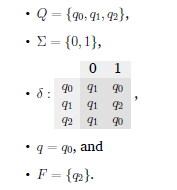
The automaton M can be equivalently represented by the state-transition diagram depicted in Figure 1. In the diagram circles represent states and arrows represent transitions. The incoming arrow into qo indicates that qo is the start state and the double circle around q2 indicates that q2 is an accepting state.
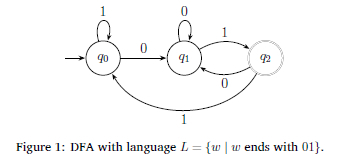
The second type of a finite automaton is a non-deterministic one - refer to Definition 3.4.
Definition 3.4 (Non-Deterministic Finite Automaton). A non-deterministic finite automaton (NFA) is a tuple M = (Q, Ʃ, δ, q, F) where:
• Q is a finite set of states,
• Ʃ is a finite set known as the alphabet,
• δ: Q x Ʃe → P(Q) is the transition function where Ee = Ʃ U {ϵ},
• q ϵ Q is the start state, and
• F ⸦ Q is the set of accepting states.
In this definition e refers to the empty string. In contrast to a DFA, the transition function of an NFA maps each pair of a state and a symbol from the alphabet to a set of possible successor states. This implies that for an input string w multiple corresponding runs of an NFA may exist. The NFA accepts an input string if at least one of the corresponding runs is accepting. The language of an NFA M is again the set of all strings w accepted by M.
The language of our running example can be also represented by an NFA which is depicted in Figure 2.
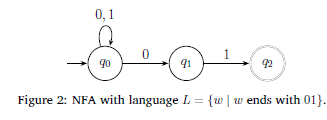
As can be seen, the automaton is non-deterministic in the sense that in state q0 the symbol 0 allows the automaton to either transition to q0 again or to qi. Moreover, the automaton also maps certain pairs of states and symbols to the empty set of successor states, which is for instance the case for the state q1 and the symbol 0. It implies that q1 does not have a successor state for the symbol 0. If we consider the example input 001, then we can see that there exist the two possible runs q0q0q0 and q0q1q2 of the automaton. Since at least the latter run ends in an accepting state, the string '001' is contained in the language of the NFA.
Every language that can be recognised by a DFA can also be recognised by a NFA and vice versa. It should be noted that NFAs typically allow to represent languages with fewer states and transitions than DFAs. The class of languages that can be described by DFAs and NFAs are the regular languages. An alternative way to define regular languages is via regular expressions.
Mathematically, a regular expression comprises symbols from an alphabet and regular operators, where the alphabet is a finite set of symbols. The language of a regular expression is the set of strings it generates, refer to Definition 3.5.
Definition 3.5 (Regular Expression). Let Ʃ be an alphabet. The set of regular expressions R(Ʃ) over Ʃ can be defined recursively as follows:
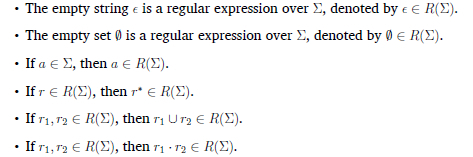
The Kleene star closure of a regular expression r, denoted by r*, generates the set of all possible strings that can be formed by repeating r zero or more times. The union of languages generated by two regular expressions r1 and r2, denoted by r1 U r2, is the set of all strings that can be generated by either r1 or r2. Moreover, the concatenation of languages generated by two regular expressions r1 and r2, denoted by r1 r2, is the set of all strings that can be generated by concatenating a string generated by r1 and a string generated by r2. For simplicity we will typically just write r1r2 for a concatenation r1 · r2.
The language of our running example is defined by the regular expression

That is, the concatenation of an arbitrary string over the alphabet Ʃ = {0,1} and the suffix 01.
An integral part of teaching automata theory is to provide students with an understanding that deterministic finite automata and non-deterministic finite automata as well as regular expressions are equally powerful concepts. Moreover, students need the skills to convert these different representations of regular languages into each other. In the following section, we discuss the types of assessment questions that are commonly used to let students develop their understanding and skills.
3.2 Assessment Questions on Finite Automata and Regular Expressions
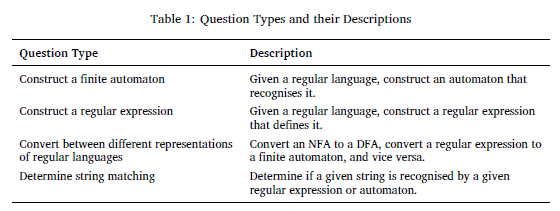
With a foundational understanding of regular languages, finite automata and regular expressions as outlined in Section 3.1, the focus now shifts to effective assessment methodologies for these concepts. As indicated in Table 1, certain question types can be used in evaluating students' comprehension and application skills in this field.
A concrete instance of each of these question types can be provided based on our running example from Section 3.1:
• Construct a DFA that recognises the language L = {w | w ends with 01} over the alphabet Ʃ = {0,1}.
• Construct a regular expression that defines the language L = {w | w ends with 01} over the alphabet Ʃ = {0,1}.
• Convert the regular expression (0 U 1)*01 into a DFA with the same language.
• • Is the string '001' contained in the language of the regular expression (0 U 1)*01?
The solutions to these questions can be derived from our running example.
Constructing an automaton for a given regular language is a primary question type. This requires students to embody abstract language rules into a tangible automata model, whether it be a DFA or an NFA. Regular expression constructions expect students to encapsulate the rules of a language using regular expressions, thereby testing their grasp of how these expressions delineate patterns within a language. Equally crucial is the ability to convert between different types of automata. This skill is assessed by requiring students to transform one automata form, such as a DFA, into another, like an NFA or a regular expression. This not only demonstrates their understanding of each automata type but also their proficiency in recognising the equivalences and differences between them. Lastly, assessing students on their capability to determine string matching with regular expressions is vital. This type of question is aimed at evaluating whether students can effectively apply regular expressions to ascertain the recognition of strings in a language.
Effective assessment requires the instructor to provide students with questions of different types and different levels of difficulty, let the students solve the questions, and eventually provide the students with feedback on their solutions. Questions can be provided in the form of exercise sheets and homework assignments as well as tests. In the following section we outline how the assessment process is currently implemented in the course Theoretical Computer Science at a South African university.
3.3 Assessment Process
This section integrates the discussion of the types of questions used in assessments, illustrated in Table 1, with an analysis of the assessment process in the course Theoretical Computer Science with about 200 students at a South African university. An integral part of the assessment process is a weekly homework assignment. Figure 3 graphically illustrates the assignment-based assessment process.
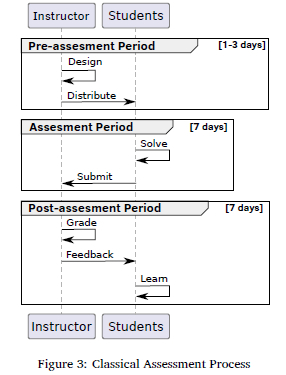
We will now discuss the major steps of the process in further detail.
3.3.1 Design
This step involves careful consideration of the learning objectives and outcomes that the assessment is intended to measure. The instructor designs an assignment worksheet. This requires the instructor to handcraft questions of the previously introduced types or to adopt questions from educational resources such as textbooks. Moreover, the instructor needs to develop a grading scheme for each question. The simplest form of a grading scheme is to provide marks for a fully correct solution only. The types of questions on regular languages also allow for a more differentiated grading scheme: Half of the marks if the student solution accepts all strings that are contained in the given language representation, and the other half of the marks if the student solution rejects all strings that are not contained in the given language representation. This scheme can be further refined by providing a concrete list of strings that must be accepted and a list of strings that must be rejected, and awarding a mark for each correctly accepted or correctly rejected string, respectively.
The completion of the design step may require multiple days, since the instructor needs to ensure that the questions have an adequate level of difficulty. Moreover, the instructor needs to verify that the memorandum solutions and the grading schemes are error-free.
3.3.2 Solve
After receiving the assignment sheet, students have one week to solve it and submit their solutions. Students may work with pen and paper or may use an automata editor such as JFLAP.
JFLAP allows students to test their solutions by running simulations with different input strings. But the students will only be informed whether their solutions are correct after the grading step has been completed.
3.3.3 Grade and Provide Feedback
Teaching assistants grade the student submissions, which typically takes a week for a course with 200 students. Students receive feedback by means of marks and possibly counterexamples that indicate where the submitted solutions are erroneous. Constructive feedback is crucial for the students' learning process, as it helps them understand their mistakes and grasp the concepts more effectively.
JFLAP may be used to aid the grading step, which however does not allow to automatise the grading. Teaching assistants are still required to explicitly test certain input strings. Manual grading may involve grading errors.
3.3.4 Learn
One week after the submission students receive their marks and feedback.
The delay between the submission and the feedback can lead to a disconnection for students, who might lose the context or the line of reasoning that led them to their original solutions.
3.4 Conclusions of the Assessment Process
We illustrated the assessment process based on a homework assignment on finite automata. Different types of assessments such as tests, and assessing different topics of automata theory involve similar steps and efforts. As pointed out, the use of existing automaton simulation tools can help students to test their solutions, and it can support graders in the marking step. However, the process still has several limitations and drawbacks. Students only receive delayed feedback and the quality of the feedback depends on the grader. Moreover, designing questions, grading as well as providing feedback is error-prone and requires manual effort, which increases with the number of students in the course.
In the next section, we present our novel digital framework for teaching and assessment of automata theory and we discuss how the framework allows to overcome several drawbacks of the classical assessment process.
4 DIGITAL FRAMEWORK FOR TEACHING AND ASSESSMENT OF AUTOMATA THEORY
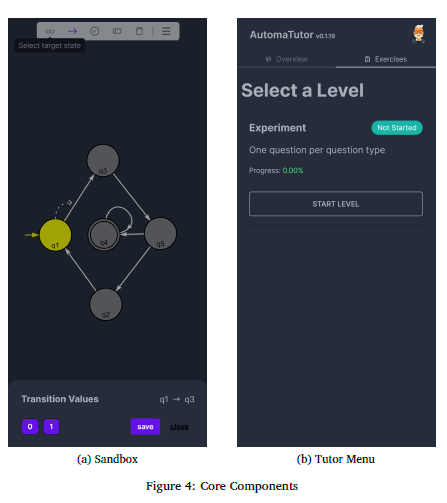
AutomaTutor is a digital platform crafted to improve the teaching and learning of automata theory and to enable a digitally enhanced assessment process. It is designed with dual interfaces, catering to both students and instructors: the student interface is a mobile application, offering a dynamic and interactive learning experience, while the instructor interface, currently accessible through the source code, allows for the generation of new exercises and assignments. This educational tool focuses on core areas such as usability, feedback, and generation, featuring two primary components - a sandbox which is an editor for free-form exploration and creation of automata as depicted in Figure 4(a), and a digital tutor for structured learning and assessment, seen in Figure 4(b). The tutor allows students to solve instructor-generated exercises and assignments within the app. AutomaTutor provides a flexible and user-centric learning environment, accessible via https://automatutor.netlify.app and optimised for mobile phone use.
4.1 Core Features
At the heart of AutomaTutor lies a fundamental commitment to user engagement, encapsulated through its trio of core features: usability, feedback, and generation. These features are designed to not only simplify the interaction with the tool but also to sustain and enhance the learning experience. Usability ensures a smooth and intuitive engagement with the application, feedback mechanisms aim to retain and deepen this engagement by providing meaningful insights, and generation features serve to broaden the scope and extend the longevity of user engagement.
4.1.1 Usability
Addressing a key gap in existing automata tools, AutomaTutor has been purposefully designed with a mobile-first approach to offer an intuitive and user-friendly interface. Optimised for touch-based interactions, it incorporates gestures such as taps and swipes for the seamless construction and modification of automata. Central to its usability is the automatic arrangement of automata components, ensuring a visually organised and clear presentation. The interface dynamically adjusts the zoom level and diagram positioning, providing an optimal screen view. This adaptability is crucial, particularly when dealing with larger automata, as it maintains readability and ease of interaction, embodying modern mobile application standards in gesture-based navigation.
4.1.2 Generation
AutomaTutor allows to automatically generate questions on regular languages that can be used as exercises or assignments, and it allows to generate counterexamples that illustrate where an incorrect student solution differs from the memorandum solution.
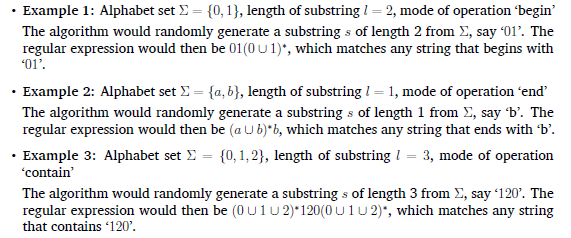
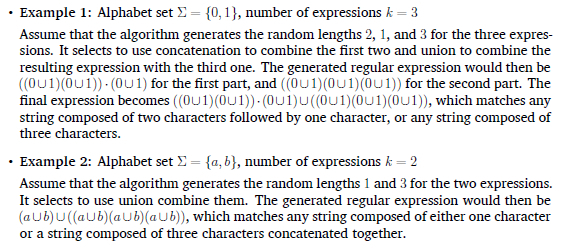
Regular Expression Generation We present algorithms for generating regular expressions that centre on substrings, string length, and the synergistic use of these elements through concatenation and union operations. We begin by considering exercises related to substrings. Specifically, these exercises involve identifying strings that either begin with, end with, or contain certain substrings. Here, we propose Algorithm 1 to generate corresponding regular expressions for these scenarios.
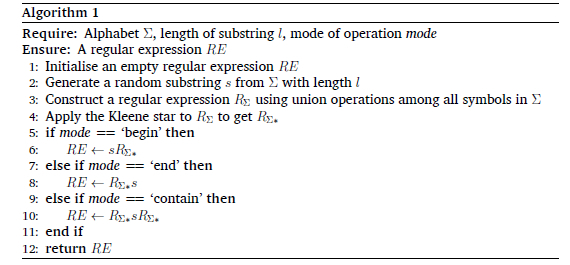
In the following we provide a number of examples that show Algorithm 1 in use.
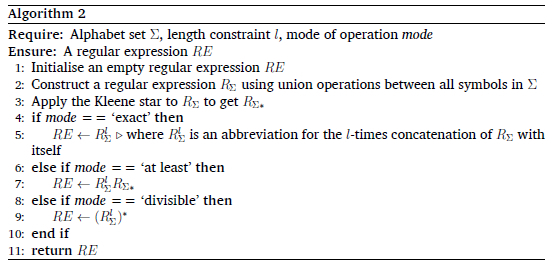
Next we consider regular expressions that are focused on string length, specifically, regular expressions that require identifying strings of exact length, strings that are at least of a certain length, or strings whose length is divisible by a particular value. Algorithm 2 below outlines the method for generating a regular expression based on a given alphabet E and the constraints on string length.
Below we illustrate Algorithm 2 with a few examples.
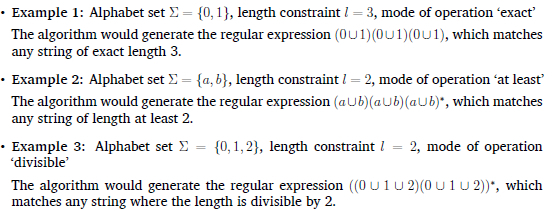
The algorithm would generate the regular expression  , which matches any string where the length is divisible by 2.
Finally, Algorithm 3 generates complex regular expressions based on an input alphabet Ʃ and a specified number k of expressions to generate and combine.
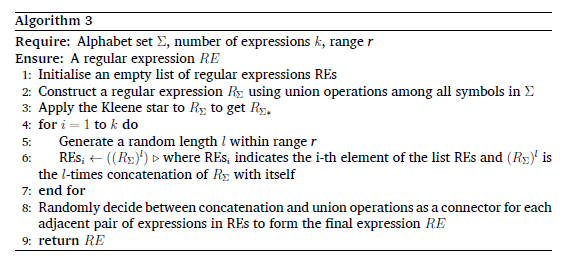
A few examples of more complex regular expressions are:
• Type I Counterexamples (CexExtra): These include strings w where w ϵ L(DT'S) but
Essentially, these are strings wrongly included in the student's solution. These can be intuitively considered as false positives
• Type II Counterexamples (CexMissing): These include strings w where
. but w ϵ L(DT'M). These are strings wrongly excluded from the student's solution. These can be intuitively considered as false negatives
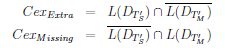
Here,  represent the complements of L(DT'm ) and L(DT'S) respectively. This is also a straightforward algorithm to compute.
By contrasting Figures 5 and 6, the distinction between the student's solution (DT's) and the memorandum solution (DT'M) becomes apparent. For example, the string '10' is accepted by DT'S but not by DT'M, making it a Type I Counterexample (CexExtra). Similarly, the string '110' is accepted by DT'M but not by DT'S, classifying it as a Type II Counterexample (CexMissing). These counterexamples are generated and used as targeted hints for students.


4.1.3 Feedback
Feedback in AutomaTutor serves as more than just a response, it is a proactive tool that guides and informs the student's learning journey. This section details the feedback modalities, each designed to offer timely and constructive insights.
Hints, designed to scaffold problem-solving skills and alleviate user frustration, play a crucial role within the application. The application presents hints as textual prompts via a pop-up interface as seen in Figure 7(a). These hints are so far manually curated, and offer users a variety of suggestions to guide their problem-solving process.
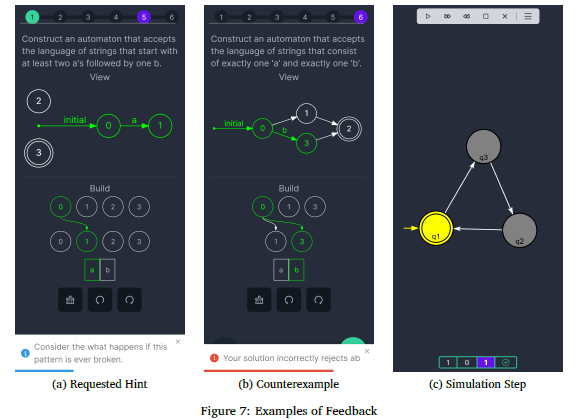
Counterexamples to incorrect student solutions are another form of feedback that AutomaTutor offers. Figure 7(b) shows how a counterexample is presented to the learner by means of a pop-up. As discussed in the previous section, the application generates counterexamples automatically.
The Simulation (Figure 7(c)) feature in the application is primarily integrated within the sandbox. This allows users to construct automata and simulate string inputs against them, fostering an active learning experience. The automata simulation in the application utilises colour highlighting to indicate the active state and transitions during the simulation. The application also incorporates an animation that signifies the reading of the next input symbol. An accepted or rejected input is highlighted in green or red, respectively, providing clear feedback to the user.
Upon completing an exercise or an assignment, users are presented with a summary of their performance. This feedback includes basic metrics such as the number of submission attempts, time taken, and percentage correct (in case some questions were left incorrect or unanswered). This information helps users identify areas where they excelled and those where improvement is needed, guiding their future learning efforts.
4.2 Digitally Enhanced Assessment Process
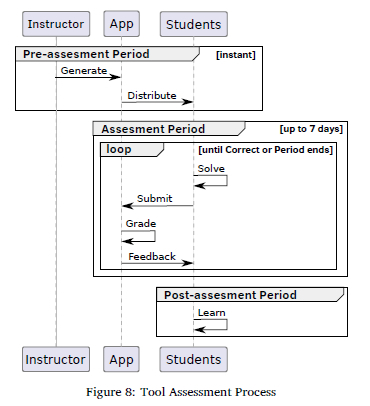
The features of AutomaTutor allow to introduce a digitally enhanced assessment process that overcomes several shortcomings of the classical assessment process. This section delves into the specifics of this enhanced process (see Figure 8), illustrating how each step is redefined to facilitate a more effective and engaging learning environment.
4.2.1 Design
In AutomaTutors digitally enhanced assessment process, the design phase is streamlined. Instructors can specify the parameters for the assessment types and difficulty levels, and the tool automatically generates a variety of exercises and assignments, including memorandum solutions. This feature not only saves time but also ensures a diverse range of questions, tailored to meet the course's learning objectives effectively.
4.2.2 Solve
Students engage with AutomaTutor to solve the generated question sets. The usability features of the app, such as gesture-based interactions and automatic layout adjustments, make the solving process more intuitive and efficient. This immediate interaction with the tool facilitates an active and immersive learning experience, vital for understanding automata theory. If the question sets are used as exercises, then the app provides immediate feedback in the sense of hints and counterexamples. This instant feedback mechanism ensures that any misconceptions are addressed promptly, facilitating a more effective and responsive teaching environment. Hints can be disabled when question sets are used as assignments.
4.2.3 Grade and Provide Feedback
A standout feature of AutomaTutor is its capability to deliver immediate grading and insightful feedback. When students submit their responses, the tool promptly assesses them in comparison to the memorandum solutions. Marks are automatically awarded based on the existence or non-existence of counterexamples in the student solution. This automated evaluation not only benefits students but also significantly advantages instructors.
For instructors, this functionality translates to a substantial reduction in the time and effort traditionally spent on grading assignments. They no longer need to manually check each student's submission, a process that can be especially cumbersome in large classes. Instead, AutomaTutors automated system handles the assessment.
4.2.4 Learn
Immediately after the submission of an assignment via AutomaTutor the students receive their marks and, if applicable, counterexamples that illustrate why their solution is incorrect. This instant feedback cycle facilitated by AutomaTutor allows students to quickly assimilate and rectify their mistakes, enhancing the overall learning process. This feature is particularly beneficial in a course with a large number of students, as it ensures timely and personalised feedback for each student, fostering a deeper understanding of automata theory.
4.3 Conclusions of the Enhanced Assessment Process
The integration of AutomaTutor into the assessment process of automata theory represents a significant improvement over traditional teaching and assessment methods. The tool's automation of exercise generation and grading not only reduces the instructor's workload but also provides students with an immediate and interactive learning experience. In the next section we present experimental results on how the introduction of AutomaTutor impacts student performance, engagement and satisfaction.
5 EVALUATION
In pursuit of understanding the efficacy of digital platforms in teaching automata theory, we conducted an experiment1 with fourth-year computer science students at our university in South Africa. The experiment compared two distinct teaching methodologies: traditional paper-based assignments and app-based assignments. The objective was to assess how these methods would influence students' performance, their user experience, and the overall effectiveness of learning.
5.1 Methodology
This section provides a detailed guide to how the experiment was conducted. We explore the steps, tools and procedures utilised to maintain transparency.
5.1.1 Participants
The participants comprised of 45 students enrolled in the fourth-year of their computer science programme. Therefore, participants were expected to have a higher level of academic maturity and subject expertise than an ideal test group. However, twenty of the students had recently transferred from other institutions and claimed to have little to no expertise on the subject matter. The remaining twenty five students had originally been introduced to the content being examined two years prior to the experiment. Given the two-year hiatus, the study expected varying degrees of content recall among the participants. Furthermore, it should be noted that participation was voluntary, and the students were briefed about the research goals.
5.1.2 Question Sets
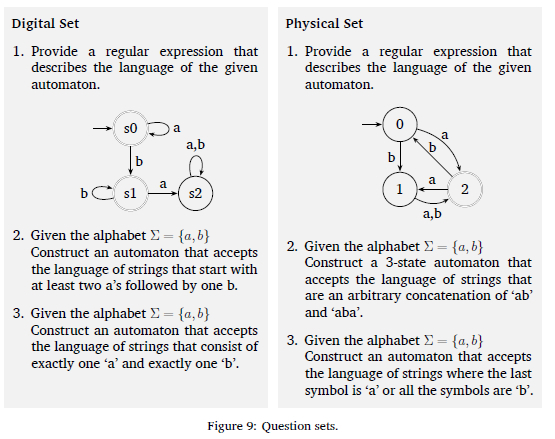
A physical worksheet featuring three question types previously defined in Section 3.2 was used. Mirroring the worksheet, AutomaTutor provided an interactive digital counterpart with three questions of the same types and the same level of difficulty. The question sets are depicted in Figure 9.
5.1.3 Questionnaire
Post-experiment, a questionnaire was used to gather qualitative data on the participants' experiences. It included various types of questions, from scaled responses to open-ended queries, aimed at understanding user preferences and perceived challenges with both teaching methods. The following questions were included in the questionnaire:
1. Did you complete COS210 at the University of Pretoria?
2. Which exercise did you start with?
3. How would you rate your overall experience using pen and paper for solving exercises?
4. How would you rate your overall experience using the mobile app for solving exercises?
5. Which format did you prefer for problem-solving: pen and paper or the app?
6. Please explain why you preferred the previously mentioned format.
7. Did you encounter any technical issues while using the app? If so, please elaborate.
8. Which questions were you able to complete on the app?
9. How many hints did you use on the app?
10. How many incorrect answers did you submit on the app?
11. What features of the app did you find most beneficial for learning?
12. What improvements could be made to the mobile application to enhance the learning experience?
13. Do you have any additional comments or suggestions regarding this experiment?
5.1.4 Data Collection and Management
The traditional worksheets were manually graded and the data was digitised for analysis, while AutomaTutor automatically graded the digital worksheets. For both types of worksheets, the grading scheme was one mark for each correctly solved question and no marks for incorrect solutions. Questionnaire responses were managed through a secure, anonymised platform.
5.1.5 Procedure
The experiment was conducted in a controlled setting to ensure minimal external influence on the outcomes. The process was structured as follows:
1. Preparation Phase: A brief content refresher was provided, followed by an overview of the study's objectives.
2. Execution Phase: Participants were evenly divided into two diverse groups. The first group initially interacted with the app, followed by a switch to the paper worksheet after a short break. The second group interacted with the two teaching methods in reverse order.
3. Data Collection Phase: Worksheets were collected for manual data recording, while the app automatically exposed relevant metrics.
4. Feedback Phase: Participants completed a questionnaire to capture their subjective experiences with each teaching method.
5. Data Management and Analysis: All data, both from the app and worksheets, were digitised and securely stored for subsequent analysis.
The following section presents the results of this experiment, offering insights into the effectiveness of traditional versus app-based assignments in teaching automata theory.
5.2 Results
This section summarises the experimental results with regard to experiences and performance of participants. The detailed results can be found in Appendices A and B.
5.2.1 Perceived Experiences by Participants
Participants were asked to rate their overall experience with each medium on a scale of one to five, as depicted in Figure 10.
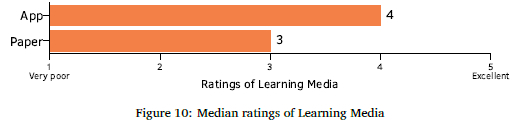
The app-based medium garnered higher ratings, suggesting a more favourable participant perception. Furthermore, when queried about their preferences, as illustrated in Figure 11, a majority (58%) favoured the app over traditional paper worksheets.

When considering the reasons behind these preferences, participants highlighted feeling less pressured and an enhanced freedom to experiment with solutions when using the app. The immediate feedback and interactive nature of the app were seen as key factors that reduced the stress typically associated with an exam-like setting and encouraged a more exploratory approach to problem-solving.
Conversely, a notable proportion of participants (42%) expressed a preference for the traditional paper medium. This group valued the tactile and unrestricted nature of pen-and-paper, finding it more conducive to brainstorming and free-form thinking.
5.2.2 Participant Performance per Medium
The stark contrast in performance between the two mediums, as depicted in Figure 12, necessitates a critical examination. While the data shows a pronounced improvement in participant performance using AutomaTutor, this is not solely indicative of the app's ability to enhance cognitive capabilities or learning efficiency. Rather, the key factor contributing to this disparity is the immediate feedback mechanism embedded within the app.
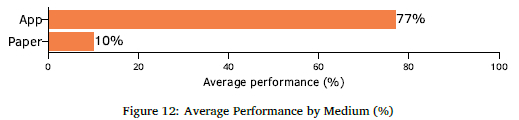
The design of AutomaTutor allows students to receive instant feedback on their submissions, enabling them to quickly identify and correct their errors. This feature is particularly beneficial in a learning environment where understanding the nuances of automata theory is crucial. The ability to immediately rectify mistakes fosters a more iterative and engaging learning process, as opposed to the static nature of paper-based assignments where feedback is delayed.
Furthermore, the app's interactive nature may have contributed to lowering the barrier to entry for students unfamiliar with the content. The app's structured yet flexible learning environment provided these students with a more approachable way to engage with the material, as evidenced by their successful performance in the exercises.
It is also noteworthy that students starting with paper worksheets showed a slight improvement in their final grades. This suggests that while traditional methods have their limitations, they still hold value and can complement digital tools in reinforcing learning.
5.3 Discussion of Findings
The experimental evaluation conducted with AutomaTutor provides insights into the effectiveness of digital platforms in enhancing the teaching and learning process, particularly in the context of automata theory. The results from the experiment lend strong support to our initial hypothesis that a digital platform can enhance the learning experience compared to traditional paper-based methods.
The experiment demonstrated that the app's immediate feedback mechanism and interactive interface contributed to a more engaging and effective learning environment. This was evident in the higher performance scores and preference ratings for the app. The ability of students, especially those unfamiliar with the content, to perform well in app-based assignments is indicative of the platform's potential as a self-contained learning tool.
However, the experiment also revealed some limitations of the digital approach. While the app was generally preferred and led to better performance, a notable proportion of participants still found value in the traditional paper-based method. This suggests that the digital platform might be more effective when used as a complement to conventional teaching methods, rather than as a complete replacement.
In light of these findings, future improvements to the digital platform could focus on integrating features that replicate some of the benefits of traditional methods, such as free-form brainstorming and the tactile experience of pen and paper. This enhancement could involve developing a feature set centered around stylus-based input, allowing users to draw solutions freely. This addition not only caters to diverse learning styles but also paves the way for future advancements in computer vision research. It presents an opportunity to train models adept at recognising and interpreting a variety of hand-drawn automata, integrating traditional drawing methods with cutting-edge digital recognition technology.
6 CONCLUSION
This research introduced AutomaTutor, a mobile application designed to facilitate the construction, simulation of finite automata, and solving of interactive exercises on automata theory and regular expressions. With a strong focus on usability and feedback features, AutomaTutor has been tailored to guide users through their learning journey without necessitating additional intervention from instructors.
The application's capabilities for automatically generating random questions of various types demonstrate its potential for a comprehensive learning experience. So far, the application operates offline on the student's mobile phone and allows them to generate exercises as well as the memorandums. Work on an online version has started which will allow lecturers to create and distribute exercises to all the students as well as track their scores using a leaderboard system.
Our experimental evaluation, involving computer science students at our university, compared traditional pen-and-paper methods with AutomaTutor for solving automata theory exercises. The results revealed a strong preference among students for the guided learning approach offered by AutomaTutor. This preference was bolstered by the app's immediate feedback mechanisms and interactive interface, which contributed to a more engaging and effective learning environment.
Looking ahead, we plan to integrate AutomaTutor into the Theoretical Computer Science undergraduate module from 2024. We anticipate that the tool will enhance students' comprehension of theoretical computer science's abstract topics. Moreover, as automata theory forms a foundational aspect of several formal methods, the introduction of AutomaTutor also aims to prepare and motivate students for advanced studies in formal methods at the postgraduate level.
Future developments of AutomaTutor will focus on expanding the range of automata types supported, including pushdown automata and Turing machines. Additionally, we intend to incorporate Kripke structures and Biichi automata to facilitate teaching model-checking subjects. In response to student feedback, we will also refine the application's usability, feedback, and question generation features. This will involve integrating elements that replicate the benefits of traditional methods, such as a stylus-input feature for free-form drawing and evaluation of solutions, thereby fusing traditional learning approaches with advanced digital technology. Another possible direction of future work is to have the generated exercises evaluated by subject matter experts.
In conclusion, AutomaTutor represents a significant step towards the digitalisation of theoretical computer science education. It not only offers an innovative alternative to traditional teaching methods but also opens up new avenues for research and development in educational technology. As it evolves, AutomaTutor has the potential to play a pivotal role in contemporary computer science education, contributing positively to the learning experiences and achievements of both students and educators.
References
Bezakova, I., Fluet, K., Hemaspaandra, E., Miller, H., & Narvaez, D. E. (2022). Effective succinct feedback for intro CS theory: A JFLAP extension. Proceedings of the 53rd ACM Technical Symposium on Computer Science Education - Volume 1, 976-982. https://doi.org/10.1145/3478431.3499416
Bohnenkamp, H., D'Argenio, P., Hermanns, H., & Katoen, J.-P. (2006). MODEST: A compositional modeling formalism for hard and softly timed systems. IEEE Transactions on Software Engineering, 32(10), 812-830. https://doi.org/10.1109/TSE.2006.104 [ Links ]
Brzozowski, J. A. (1962). Canonical regular expressions and minimal state graphs for definite events. Proceedings of the Symposium of Mathematical Theory of Automata, 529-561. https://api.semanticscholar.org/CorpusID:1 18363215
Butkova, Y., Hartmanns, A., & Hermanns, H. (2021). A Modest approach to Markov automata. ACM Transactions on Modeling and Computer Simulation, 31(3). https://doi.org/10.1145/3449355 [ Links ]
Chakraborty, P. (2007). A language for easy and efficient modeling of Turing machines. Progress in Natural Science, 17(7), 867-871. https://doi.org/10.1080/10002007088537484 [ Links ]
Chakraborty, P., Saxena, P. C., & Katti, C. P. (2011). Fifty years of automata simulation: A review. ACM Inroads, 2(4), 59-70. https://doi.org/10.1145/2038876.2038893 [ Links ]
Coffin, R. W., Goheen, H. E., & Stahl, W. R. (1963). Simulation of a Turing machine on a digital computer. Proceedings of the November 12-14, 1963, Fall Joint Computer Conference, 35-43. https://doi.org/10.1145/1463822.1463827
Cogliati, J. J., Goosey, F. W., Grinder, M. T., Pascoe, B. A., Ross, R. J., & Williams, C. J. (2005). Realizing the promise of visualization in the theory of computing. Journal on Educational Resources in Computing (JERIC), 5(2), 5. https://doi.org/10.1145/1141904.1141909 [ Links ]
D'Antoni, L., Helfrich, M., Kretinsky, J., Ramneantu, E., & Weininger, M. (2020). Automata tutor v3. In S. K. Lahiri & C. Wang (Eds.), Computer aided verification (pp. 3-14). Springer International Publishing. https://doi.org/10.1007/978-3-030-53291-8_1
Hamada, M. (2008). Supporting materials for active e-learning in computational models. International Conference on Computational Science, 678-686. https://doi.org/10.1007/978-3-540-69387-1_79
Hannay, D. G. (2002). Interactive tools for computation theory. ACM SIGCSE Bulletin, 34(4), 68-70. https://doi.org/10.1145/820127.820169 [ Links ]
Harris, J. (2002). Programming non-deterministically using automata simulators. Journal of Computing Sciences in Colleges, 18(2), 237-245. https://dl.acm.org/doi/pdf/10.5555/771322.771357 [ Links ]
Hartmanns, A., & Hermanns, H. (2014). The Modest Toolset: An integrated environment for quantitative modelling and verification. In E. Abraham & K. Havelund (Eds.), Tools and algorithms for the construction and analysis of systems (pp. 593-598). Springer Berlin Heidelberg. https://doi.org/10.1007/978-3-642-54862-8_51
Jovanović, N., Miljković, D., Stamenković, S., Jovanović, Z., & Chakraborty, P. (2021). Teaching concepts related to finite automata using ComVis. Computer Applications in Engineering Education, 29(5), 994-1006. https://doi.org/10.1002/cae.22353 [ Links ]
Knuth, D. E., & Bigelow, R. H. (1967). Programming language for automata. Journal of the ACM(JACM), 14(4), 615-635. https://doi.org/10.1145/321420.321421 [ Links ]
LoSacco, M., & Rodger, S. (1993). FLAP: A tool for drawing and simulating automata. Educa-ttional Multimedia and Hypermedia Annual, 93, 310-317. https://files.eric.ed.gov/fulltext/ED360949.pdf [ Links ]
Maheshwari, A., & Smid, M. (2019). Introduction to theory of computation. Carleton University. https://cglab.ca/~michiel/TheoryOfComputation/TheoryOfComputation.pdf
Middleton, J., Klassen, T. Q., Baier, J., & McIlraith, S. A. (2020). FL-AT: A formal language-automaton transmogrifier. System demonstration at the 30th International Conference on Automated Planning and Scheduling (ICAPS). https://www.cs.toronto.edu/~toryn/docs/MiddletonICAPS2020flat.pdf
Pereira, C. H., & Terra, R. (2018). A mobile app for teaching formal languages and automata. Computer Applications in Engineering Education, 26(5), 1742-1752. https://doi.org/10.1002/cae.21944 [ Links ]
Robinson, M. B., Hamshar, J. A., Novillo, J. E., & Duchowski, A. T. (1999). A Java-based tool for reasoning about models of computation through simulating finite automata and Turing machines. Proceedings of the 30th SIGCSE technical symposium on Computer Science Education, 105-109. https://doi.org/10.1145/384266.299704
Rodger, S. H., & Finley, T. W. (2006). JFLAP: An interactive formal languages and automata package. Jones & Bartlett Learning. https://cs.emory.edu/~mic/cs424/jflap/book/jflapbook2006.pdf
Rodger, S. H., Wiebe, E., Lee, K. M., Morgan, C., Omar, K., & Su, J. (2009). Increasing engagement in automata theory with JFLAP. Proceedings of the 40th ACM technical symposium on Computer science education, 403-407. https://doi.org/10.1145/1539024.1509011
Romero, J. (2021). Pyformlang: An educational library for formal language manipulation. Proceedings of the 52nd ACM Technical Symposium on Computer Science Education, 576-582. https://doi.org/10.1145/3408877.3432464
Silva, R. C., Binsfeld, R. L., Carelli, I. M., & Watanabe, R. (2010). Automata defense 2.0: Reedição de um jogo educacional para apoio em linguagens formais e autômatos. Brazilian Symposium on Computers in Education (Simpósio Brasileiro de Informática na Educação-SBIE). http://milanesa.ime.usp.br/rbie/index.php/sbie/article/view/1447
Singh, T., Afreen, S., Chakraborty, P., Raj, R., Yadav, S., & Jain, D. (2019). Automata Simulator: A mobile app to teach theory of computation. Computer Applications in Engineering Education, 27(5), 1064-1072. https://doi.org/10.1002/cae.22135 [ Links ]
Stamenkovic, S., & Jovanovic, N. (2021). Improving participation and learning of compiler theory using educational simulators. 2021 25th International Conference on Information Technology (IT), 1-4. https://doi.org/10.1109/IT51528.2021.9390132
Vayadande, K. B., Sheth, P., Shelke, A., Patil, V., Shevate, S., & Sawakare, C. (2022). Simulation and testing of deterministic finite automata machine. International Journal of Computer Sciences and Engineering, 10(1), 13-17. https://doi.org/10.26438/ijcse/v10i1.1317 [ Links ]
Vieira, M., & Sarinho, V. (2019). AutomataMind: A serious game proposal for the automata theory learning. Entertainment Computing and Serious Games: First IFIP TC 14 Joint International Conference, ICEC-JCSG2019, Arequipa, Peru, November 11-15,2019, Proceedings 1, 452-455. https://doi.org/10.1007/978-3-030-34644-7_45
White, T. M., & Way, T. P. (2006). jFAST: A Java finite automata simulator. Proceedings of the 37th SIGCSE technical symposium on Computer science education, 384-388. https://doi.org/10.1145/1124706.1121460
Received: 2 February 2024
Accepted: 13 August 2024
Online: 11 December 2024
1 Ethical clearance for the experiment was received
A DETAILED QUESTIONNAIRE RESPONSES
In this appendix we provide the detailed responses to the questionnaire that was used in the experimental evaluation.
Figure 13 shows the responses to demographic questions.
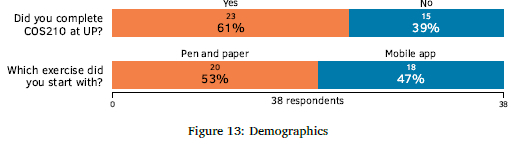
Figure 14 shows the responses to user experience questions.
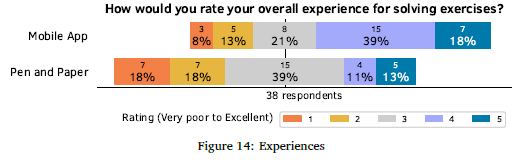
Figure 15 shows the responses to the question with regard to preference in terms of the format of solving exercises.
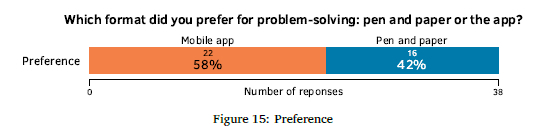
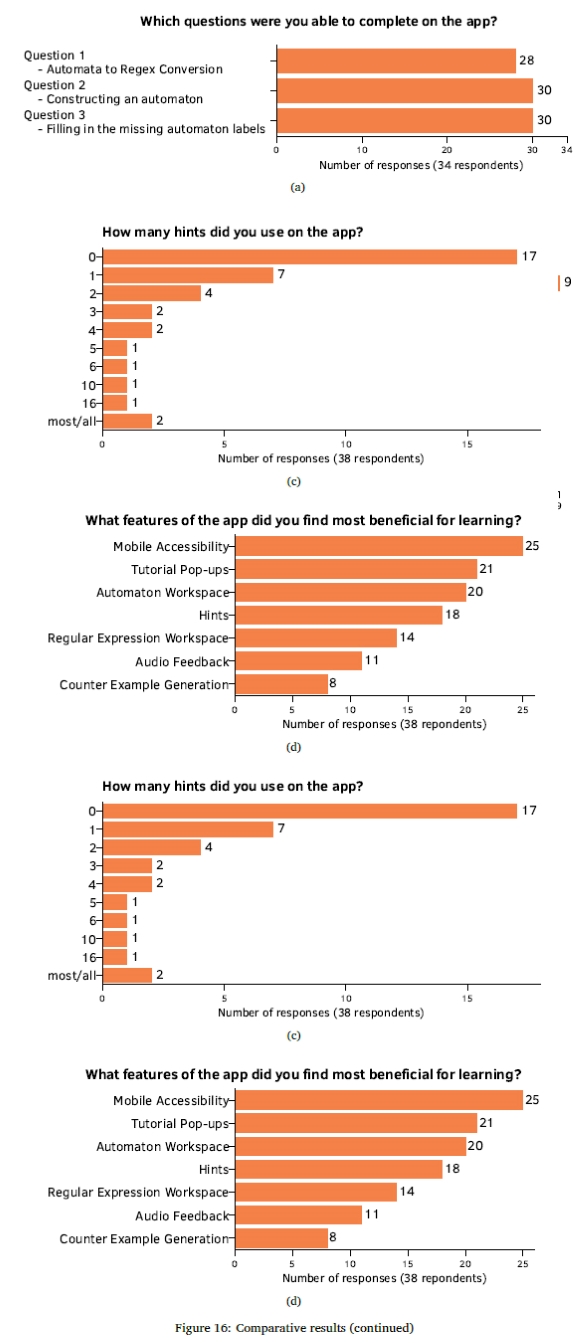
Figure 16 shows comparative results of the experimental evaluation.
B ANSWERS TO OPEN-ENDED QUESTIONS
Please explain why you preferred the previously mentioned format.
• Making a mistake was a lot easier to fix since you can just undo the last one or remove a part of it.
• I got have scrap paper and work through it
• First it saves paper, and I can attempt anywhere anytime any assessment is given to me
• The phone wasn't as convenient
• The interface was intuitive and easy to understand after the tutorial. I was not slowed down by writing and erasing-rewriting my answers as much with the app.
• Because it is linked to what I was used to
• Idk man. Pen and paper made me feel like I'm in an exam of sorts.
• Something that I'm used, plus I can jot my working out process before providing my answer
• Guided, provided hints, easier to know what is wrong while learning, less mechanical
• I like the visualization and the simplicity of using the application
• Na
• Prompt feedback made me excited to learn
• Found it simpler
• Easier to draw out the automata to a format I want and understand
• I found it easier to process the question when I had paper
• It was easier to see if i was wrong or not
• Having the feedback of correct vs incorrect helped solve the questions
• Space to scribble and make rough work.
• The feedback (on submit) was great.
• Because is understandable and it has instruction
• It offers a more familiar way of doing things or solving problems
• There was a learning curve drawing the automata on the mobile app
• I could edit at the point of error without undoing all steps before I realized error
• It had tips
• I feel indifferent, pen and paper allows you to work out different options, the mobile app requires you to calculate the options in your head or revert back to pen and paper defeating the purpose of it
• Even though it can also be done when using the mobile app, what I found easier with pen and paper is to jot down your your working outs. Especially with these types of questions that require you to work out a solution. It is quite difficult to do so when using a mobile app.
• I preferred the app as it provided a less permanent mode of solving the task (I could change my answers and problem solve without having to scratch out or use scrap paper) and I was able to easily change answers as I problem solved. The hint functionality is also a great feature for those who need assistance.
• I felt that it was easier to complete the questions and I could try something and erase if it was wrong easily with the push of a button. I also liked the fact that there were hints and feedback provided so that I could immediately see when I was wrong, what I was doing wrong so that I could fix it.
• Helps visualise the solution
• A visual representation of the problem helped me somewhat comprehend what I was supposed to do than the pen and paper
• I prefer the previously mentioned format because I was able to complete correctly 2 questions even though I didn't have enough knowledge on the topic.
• It's easier to use
• Familiarity, the mobile app was a bit confusing to navigate
• The mobile app has instructions with diagram and is more intuitive instead of having to draw out the diagrams for automaton and scratching it out if a mistake was made which cause the answer to illegible at times
• I don't have any idea for this lecture
• The hints were really informative and helpful. The game experience also made it more interesting.
• It felt like a game. Made me want to solve more problems.
Did you encounter any technical issues while using the app? If so, please elaborate.
• No
• No.
• When making a figure some explaining would be nice and the ability to see your language
• It feels like a drag and drop interface would be better
• It kept rejecting my answer
• Nope
• Yeah I had to resubmit wrong solutions to see the example expression due to a timer
• Yes, the pop ups disappeared and I couldn't view them again
• No, maybe the wording was a bit confusing, but that could also be my rusty knowledge
• None.
• no
• It was not ergonomically friendly
• No issue experienced
• No the tutorial was just a bit too long
• Cant navigate to a specific character, you have to backspace all the characters to get to the one you want to change
• Yes I did. I pressed one of the buttons below multiple times and the web site crashed
• None at all
• No I didn't
• Yes. I couldn't figure out the interface.
• No issues
• The button to bring back the hints only worked for the first click.
Do you have any additional comments or suggestions regarding this experiment?
• No
• Nope
• None
• N/A
• Cool idea. Wish it was a thing when I did 210.
• I want to see a much more complex example be rendered on a small mobile device interface.
• Something about popup tutorials urks me
• Nothing made sense for me.
• Well made
• No
• I would make the option to reopen the tutorial pop up a bit more clear
• A gif or example illustrating how things work.
• no
• Its has great potential. Just wondering if it could handle very large automata. At least drawing them
• Allow user to click on point of error and only change that portion as opposed to undoing all steps to get to that point
• None. Great experiment!
• More sounds!
• The experiment worked work actually
• Very well done!
