



Services on Demand
Journal

Article
 English (pdf)
 Article in xml format
 Article references
 Automatic translation
 Send this article by e-mail
Indicators
Related links
-
 Cited by Google
 -
 Similars in Google
Share

 Permalink
South African Computer Journal
On-line version ISSN 2313-7835Print version ISSN 1015-7999
SACJ vol.37 n.2 Grahamstown Dec. 2025
https://doi.org/10.18489/sacj.v37i2.21524
RESEARCH ARTICLE
Investigating the support of proprioception and visual guidance for menu selection in virtual reality
Kwan Sui Dave Ka; Isak de Villiers Bosman; Theo J.D. Bothma
University of Pretoria, PO Box 14679, Hatfield, 0028, Pretoria, South Africa. Email: Kwan Sui Dave Ka - dave.ka@up.ac.za (corresponding) Isak de Villiers Bosman - isak.bosman@up.ac.za Theo J.D. Bothma - theo.bothma@up.ac.za
ABSTRACT
Virtual reality (VR) technology enhances spatial awareness in the virtual environment, yet current menu design research seldom explores how this can support interaction. This study investigates how proprioception, users' sense of body position, can guide menu selection in immersive VR environments. A menu system was developed to test how users interact with menu items using non-visual senses, supported by visual cues. Across three usability sessions, participants engaged with the system, and their evolving behaviours were examined through performance metrics, observations, interviews, and focus groups. Thematic analysis revealed that while users can learn to use proprioceptive cues for menu selection, they rarely rely on them without visual guidance. Effective use requires systems that support spatial awareness and familiarity, allowing interactions to become intuitive and memorised over time. The study also identifies types of visual guidance linked to varying levels of familiarity with surrounding virtual objects. These findings contribute to VR interaction design by demonstrating how visual and proprioceptive cues affect user behaviour and support efficient, embodied menu selection.
Categories · Human-centred interaction ~ Human computer interaction, Interaction paradigms, Virtual reality
Keywords: virtual reality, menu system, visual guidance, proprioception, user behaviour
1 INTRODUCTION
Virtual reality (VR) technology can provide an immersive experience for users to feel part of a three-dimensional (3D) virtual environment, making an accessible way for an embodied and personal experience that may otherwise be challenging, e.g., viewing Mount Everest from the summit (Sólfar Studios, 2017), or impossible, e.g., inspecting enlarged visualisations of small animal organs (Liimatainen et al., 2021). These kinds of experiences need different functions to help users interact with virtual elements in these virtual environments.
A method for doing so is to make use of a menu system which serves as a navigational tool that allows users to access functions and features systematically, ensuring that the interaction with a digital environment is intuitive and productive (Bailly et al., 2016). Well-designed menu systems facilitate clear pathways to functionalities, thereby reducing cognitive load and easing learning curves that can accommodate both novice and expert users through structured layouts and familiar design patterns (Shneiderman et al., 2018). By integrating principles of usability and user-centred design, menu systems help streamline tasks while also enhancing overall user satisfaction, making them a crucial aspect of effective user-interface (UI) design. There is substantial literature that provides usability guidelines and principles
There is substantial literature that provides usability guidelines and principles for menu system interactions (Bowman & Wingrave, 2001; Cockburn et al., 2007; Eriksson, 2016). Existing research on menu system design in 3D virtual environments has emphasised the importance of enhancing immersion. This is achieved by making menu systems visually believable as part of the virtual environment, i.e., diegetic (Bailly et al., 2016), enabling more natural interaction and improving the overall user experience.
Building upon this idea of improving menu systems design by supporting an immersive experience, the intended outcome of this study was to explore interactions with menu systems that feel natural and intuitive. Therefore, a more immersive approach was investigated to support the selection process. Improving the usability of the selection process for menu systems is important because this action is done repeatedly and rapidly (Argelaguet & Andujar, 2013).
In addition to the visual representation of menu systems, there has been research conducted to optimise selection by investigating the impact of the layout for menu items (Bailly et al., 2016). However, this does not include investigating the improvement of menu item selection, specifically regarding the action of selection for menu systems within the context of immersive technologies like VR. Virtual reality interactions have also been thoroughly explored, some of which are used to inform interaction design for menu systems in VR. In VR, where the user feels part of the virtual space, this feeling can be investigated as a way to consider the use of spatial awareness of menu items in the virtual space.
Since VR technology can provide an embodied experience, it presents an opportunity to leverage spatial awareness within the virtual environment to support more intuitive and effective menu item selection. Visual, audio, and haptic feedback typically contribute to establishing this spatial awareness, immersing the user in the environment. This awareness of objects and space is referred to as proprioception (Stillman, 2002). By leveraging these concepts, menu item selection can be made more intuitive, thereby enhancing the immersive quality of interactions in virtual reality. Guided by these findings, this study aimed to provide deeper insights into how these sensory inputs contribute to improved user interactions.
Therefore, this study investigated the relationship between visual cues and proprioception as a way to support menu item selection. As such, this investigation was guided by the following research question:
Main research question What is the relationship between proprioception and reliance on visual guidance with regards to menu item selection?
The following supporting questions were identified to help address the main research question:
Supporting question SQ1 How can spatial awareness and familiarity with menu items be developed in a virtual environment?
This study addressed this question by examining how spatial awareness is established in a virtual environment, drawing on existing literature as well as empirical data collected as part of this study to explore the relationship between proprioception and spatial awareness. Literature provided theoretical insights into how proprioception functions in virtual contexts, while empirical data was collected to assess how users develop and rely on spatial awareness during interaction with the virtual menu system.
Supporting question SQ2 How can visual cues and haptic feedback support the use of proprioception to interact with menu items?
To address this question, a menu system was designed and tested to support users in developing awareness of each menu item. Empirical data was collected to examine how the system's properties enabled users to trust their proprioceptive senses during interaction. The research documented in this paper contributes to methods of improving menu systems design for VR by specifically investigating ways to improve menu item selection. This is done by investigating the development of user behaviour as a result of familiarity with the menu system that enables users to rely on visual and proprioceptive senses to guide the selection of menu items.
2 LITERATURE REVIEW
The discussions in this section explored various areas of literature that were used to inform menu systems design and interactions in a 3D virtual environment.
2.1 Virtual reality interactions
VR technology can provide an immersive experience that has use cases in various fields of research, such as education (Lansberg et al., 2022), marine life protection and awareness (Hofman et al., 2022), psycho-therapy (Jiuwei et al., 2020), physical therapy (Lansberg et al., 2022), and medical training (Zhang et al., 2017). These use cases are typically presented in a first-person perspective, thereby simulating an embodied experience. Interacting with virtual elements in this way through VR can be perceived as natural and intuitive because these interactions mimic actions done in the real world, e.g., reaching out with a hand to touch something, which is made possible through motion-tracking in the head-mounted display (HMD) and/or two handheld controllers and handtracking technology (Kugler, 2021; Shang & Alena, 2025). This method of interaction is known as directmanipulation which enables intuitive actions that mimic physical action (Rogers et al., 2023; Shneiderman, 1983).
To further improve the ease of use for interactions, research has also been done on various methods to improve selection accuracy, which are known as disambiguation techniques. There are various techniques for disambiguation with regard to selection which can be categorised as follows (Argelaguet & Andujar, 2013):
Manual - this refers to the user selecting the virtual object that they want to with no support from the system to assist in refining the selection, i.e., the method of disambiguation relies purely on the user's own ability.
Heuristic - this method uses heuristics to assign rankings to each object and when there is more than one nearby option then an object with a higher ranking would be selected.
Behavioural - this method makes use of algorithms to dynamically assist the user to select virtual objects. This technique also has various approaches which can be further categorised into first intersected, last intersected, and closest intersected (Moore et al., 2019).
While understanding how users interact within virtual environments is crucial for shaping immersive experiences, the effectiveness of these interactions largely depends on the underlying user interface design.
2.2 User-interface (UI) elements
The graphical user-interface (GUI) improved computer interaction by enhancing text-based systems with visual elements, such as windows, icons, menus, and pointers, that enhance usability and memory (Rogers et al., 2023). A well-designed UI not only improves the user experience but also streamlines interaction with available tools. This highlights the importance of applying UI design principles to optimise and support these interactions. Various alternative interfaces have been developed to make computer interactions more intuitive, including gesture-based controls, such as swiping or dragging icons (Bragdon et al., 2011), and motion-tracking, such as eye-tracking (Menges et al., 2019). In VR, motion-tracking of body movements, such as the head and hands, enhances immersion by enabling realistic interactions (Slater, 2018).
For immersive virtual environments, these visual UI elements can be designed for greater immersion by reconsidering them as follows:
Windows - this virtual space that is typically represented as a rectangular box on a computer screen can become an entire 3D world that the user can virtually stand in and feel like that they are a part of it,
Icons - these elements, which are typically represented as small, simple images and symbols, can become 3D objects that can dynamically change size from pocket-sized for storage to life-sized objects to engage with (Ahmed et al., 2021; Park & Kim, 2022),
Menus - sets of tools provided by menus, which are typically represented as a set of panels to navigate through, can make use of metaphors like backpacks or wristwatches (Bailly et al., 2016),
Pointers - this tool used for selection is typically represented as a mouse cursor to point and click on other on-screen elements, which can evolve into intuitive tools like 3D object grabbing (Ahmed et al., 2021). The menu system is particularly notable for its role in accessing other tools.
2.3 Use of menu systems
Since the menu system is a UI element that helps users navigate a virtual environment by structuring functions (Cockburn et al., 2007), it plays an important role in supporting a user to carry out a task effectively (Chertoff et al., 2009). In the context of a 2D monitor display, the UI is limited to the monitor display. However, VR technologies immerse users in the 3D virtual environment, allowing the UI to be around the user (Calleja, 2011). Because of this, the UI is any interactable virtual object in the virtual environment, thus creating the need to reconsider how menu systems should be accessed.
Properties of a menu system, such as layout and positioning, affect the ability to learn and memorise menu items that support the user in completing a main task. Therefore, previous studies have explored menu layouts such as a linear layout which provides menu items structured as a straight list, i.e., vertical or horizontal (Chertoff et al., 2009). The linear layout follows a structure that is commonly used to present options however it comes with the limitation that some items are further away, thus making them more difficult to select (Poupyrev et al., 1996). To address this issue, a radial menu was designed that made use of a circular structure to ensure all menu items are equidistant and ensuring that all items require minimal effort to select (Komerska & Ware, 2004). Various other menu layouts have been explored in other studies such as contextual menus that display variations of items based on the context that it was activated in (Rogers et al., 2023), morphing menus that have menu items change in priority and ease of use the more often an item is used, and finger counting menus that rely on child-like finger actions for menu item layout and selection (Kulshreshth & LaViola, 2014); however, a detailed discussion of each of these is beyond the scope of this paper.
Although there are various layouts for menu systems, all of them face the same limitation, i.e., limited space without causing clutter (Shneiderman et al., 2018). For menu systems that have a lot of items, multiple layers can be used in the form of submenus where items can be grouped according to function-based categories. However, multiple layers of submenus should be approached cautiously, as it can obscure functions from users unfamiliar with their location (Bowman & Wingrave, 2001). Additionally, repetitive menu selection can lead to physical strain, which is further intensified in immersive technologies due to the large, full-body movements required, increasing fatigue (Ren & O'Neill, 2013).
For a menu system to be helpful, menu options should be accessible on-demand and easily dismissible when they are no longer needed (Bailly et al., 2016; Raskin, 2000). To adhere to these properties, existing design solutions have attached menu systems to specific objects within the virtual environment where the options available are linked to the specific object's properties (Rogers et al., 2023). Doing so provides the user with menu options only when they want to change the properties of the specific object. However, the approach described above limits the user's access to their ability to select the object, e.g., being close enough to see or point at the object. This is particularly relevant when every object in the virtual environment has an identical set of options in its associated menu as having multiple menus will result in redundancy. To overcome this limitation and redundancy, menu systems can attach the menu to the user instead of specific objects, ensuring functions are accessible regardless of the user's location in the virtual environment. This proximity also increases user awareness of available functions.
2.4 Body-relative interactions
Body-relative interaction involves locating items relative to the body, such as finding a pen in a pocket through touch and proximity (Stillman, 2002). In virtual environments, leveraging this concept requires immersion, which fosters spatial awareness of the body and nearby objects through proprioception - a sense guided by the nervous system and motor skills, enabling intuitive and natural interactions and can improve memory and cognition (Bernard et al., 2022; Taylor, 2009). Through these sensory experiences, our spatial relationship to objects supports physical interactions and enhances cognitive functions.
Embodied cognition is a theory suggesting that cognitive processes are influenced by sensory and motor experiences, not just mental activity (Wilson & Golonka, 2013). This idea has inspired embodied design in immersive virtual environments, where physical interaction shapes how users experience and interpret the virtual world (Weijdom, 2022). How we perceive and engage with our surroundings directly impacts our thoughts and behaviours, extending to our interactions with people and objects, including those in virtual environments. This highlights the integral role of the body in shaping cognitive and experiential processes.
Proxemics, which relates to comfort based on proximity to people and objects, parallels how we experience items near our body (Hall et al., 1968). A study found that humans excel in close-range tasks, driven by proprioception and visio-tactile perception, however, immersive environments are currently optimised for interactions at arm's length (Mohanty et al., 2022), leaving interactions within closer range underexplored.
A general sense of spatial awareness allows individuals to perceive and interact with objects near their body more effectively, making these objects easier to familiarise themselves with (Mine et al., 1997). This interaction that is done without looking is referred to as eyes-off interaction (Bowman & Wingrave, 2001; Mine et al., 1997). Because of this, several studies have investigated the usage of this awareness for the virtual environment (Bernard et al., 2022; Boeck et al., 2006; Yan et al., 2018). To establish spatial awareness through proprioception, users must be able to sense the virtual objects and environment. VR technology can facilitate this awareness, which creates a sense of presence in the virtual space, allowing users to feel immersed and more easily connect with the virtual objects (Matamala-Gomez et al., 2019; Petkova & Ehrsson, 2008).
Consideration of the user's body in designing VR interactions offers three notable benefits:
1. users have a familiar frame of reference for interactions, i.e., their own body,
2. they feel a sense of control, and
3. they can potentially perform eyes-off interaction (Hofman et al., 2022; Mine et al., 1997).
These benefits lend themselves towards supporting users in developing familiarity with a system, in this case, a menu system, which can be observed through different user behaviours.
2.5 User behaviours relating to levels of expertise
Interactions with a software system typically exhibit different user behaviours that can be associated with different levels of expertise (Shneiderman et al., 2018). Users who are learning to use a system go through different stages that can be identified through user behaviours as well (Fitts & Posner, 1967). These behaviours can be categorised as follows:
• Novice users are in the cognitive stage where they are actively learning to perform interactions which require careful attention. Because they are actively learning, their actions are intentional and slow (Ericsson & Harwell, 2019).
• Experienced users go through the associative stage, where some knowledge is established, so they focus on improving their interaction skills rather than learning to perform interactions (Cockburn et al., 2014).
• Expert users have reached the autonomous stage where their interactions are habitual due to extensive practice and their attention is no longer on the interactions with the system but rather on the task at hand (Schneider & Shiffrin, 1977; Wickens et al., 2021). Because little attention is given towards interaction with the system, this may result in multi-tasking and performing eyes-off interaction (Cockburn et al., 2014).
The user behaviours associated with expertise also apply to reliance on visual guidance. Less experienced users depend on visual cues for interactions, but as they gain confidence, this reliance decreases. Well-practiced interactions require minimal visual attention, a trait common among expert users (Schramm et al., 2016). Evidence suggests that body-relative interactions, proprioception, and visual reliance can indicate expertise progression in a system (Bowman & Wingrave, 2001; Shneiderman et al., 2018; Yan et al., 2018). For this reason, the observation of changes in user behaviours while using a menu system was considered as a method of identifying progression in expertise. Doing so provided various focal points for observations so that the user experience with a menu system could be understood. As a result, this provided a means to understand how users progressively develop the ability to become familiar with a menu system and learn to rely on proprioception to support the interactions with the menu system. Although this has been done for interactions with virtual objects in general, to the best of the researchers' knowledge, proprioception has not yet been investigated as a means to support menu item selection in VR.
Therefore, the current study investigated proprioception and reliance on visual guidance as user behaviours to understand how these can support menu item selection in a 3D virtual environment. For the purpose of this study, user behaviours were analysed as indicators of progressing expertise in using a menu system within a virtual environment. Specifically, proprioception and reliance on visual guidance were investigated to understand how these two behaviours related to one another as expertise increased.
3 METHODOLOGY
This study adopted a qualitative approach to investigate how participants use proprioception to interact with a menu system and categorise these behaviours. More specifically, these behaviours were examined through the lens of the participants' personal experiences which were captured by observing their behaviours and self-reported feedback. Performance data were also used to verify reported experiences.
This approach, centred on the individual's experience, highlighted how users progressed from unfamiliarity with the system to expertise, with menu navigation becoming intuitive and allowing them to focus more on task completion than selecting items. Their experiences were examined through this transition, providing insights into their behaviours. To understand how participants' experiences were shaped by the VR technology used in this study, their previous experiences were cross-referenced with their current experiences as part of this study (Merriam & Tisdell, 2015).
User interactions with the Belt Menu were examined through direct, firsthand experience, allowing for a thorough exploration of how participants navigated VR menu systems. This method yielded valuable insights into interaction patterns and laid a foundation for understanding immersive interface design. Furthermore, by focusing on real-time behaviour, the study uncovered subtle proprioceptive responses, such as eyes-off interactions, that standardised questionnaires, with their inherent structure, would have been too restrictive to detect. Objective user performance data were recorded to further validate these findings and account for potential bias in self-reported performance. Discrepancies between perceived and recorded performance were then analysed to reveal underlying reasons, ensuring that participant perspectives were fully considered.
While existing studies have explored the use of proprioception in VR interactions (Boeck et al., 2006; Mine et al., 1997), there is limited empirical research specifically focused on menu system interactions. To address this gap, usability tests were conducted in a controlled environment to examine user behaviour while using a menu system to complete an assigned task.
3.1 Participants
System testing typically relies on performance metrics and larger sample sizes to identify and address specific usability issues (Barnum, 2010). These studies often prioritise generalisability, which informs the use of broader participant groups. However, appropriate sample size should be determined by the study's objective rather than a standard numerical benchmark; that is, the validity of usability studies is not solely dependent on whether a sample is large or small (Schmettow, 2012). In this study, the focus was not on pinpointing system flaws, but rather on understanding users' experiences and behaviours when interacting with a VR menu system. Accordingly, an exploratory, qualitative approach was adopted to gain insight into participants' firsthand perceptions and interactions. Qualitative research emphasises nuanced understanding over generalisability and typically employs smaller, purposefully selected samples that are sufficient once data saturation, when no new insights are observed, is reached (Guest et al., 2006).
As part of the recruitment criteria, participants were required to have prior experience with video games to ensure familiarity with virtual environments and reduce the influence of novelty on their interaction with the system. Demographic data was excluded due to ethical restrictions by the EBIT Faculty at the University of Pretoria. To collect enough reliable data on experience with a system, previous studies have shown that 3-5 participants can identify 80% of usability issues (Nielsen & Landauer, 1993), however, this approach often lacks sufficient data to determine whether these issues are frequent or isolated occurrences (Cazañas et al., 2017). Samples of 10-20 participants are thus recommended to improve the reliability of findings and achieve 90% issue detection (Faulkner, 2003; Lindgaard & Chattratichart, 2007). Accordingly, purposive sampling was employed to recruit 17 participants through personal networks who matched the aforementioned criteria. These participants represented a diverse range of experience with VR technology, from no prior exposure to professional development with head-mounted displays (HMDs) and motion-tracked controllers, ensuring a broad spectrum of skill levels within the sample.
3.2 Materials
To fulfil the study's requirements, a new menu system was developed to support body-relative interactions for menu item selection, as no existing system supported menu system interactions around the user's body. This custom system served as a research tool to investigate the relationship between proprioception and visual guidance. Participants used it to access functions and complete structured tasks, allowing for the observation and analysis of their interactions. To ensure good usability for menu systems design, one set of guidelines and one set of design goals were identified.
Drawing on concepts from various studies, four key characteristics were identified that a menu should embody to effectively sustain its intended function and behaviour (Bailly et al., 2016):
1. Menus should present a list of items that represent functions, enabling users to efficiently complete tasks (Foley et al., 1984).
2. Menus items must be presented in a visually organised structure (Dachselt & Hübner, 2007).
3. Menus should be transient, displaying information temporarily and allowing for easy dismissal (Jakobsen & Hornak, 2007).
4. Menus should be quasimodal, requiring continuous user interaction to remain active (Raskin, 2000).
The five requirements listed below provide an appropriate goal to determine what should be expected from a new menu system (Bowman & Wingrave, 2001):
1. Users should achieve at least the same level of efficiency and accuracy as with other menu systems if not improved performance.
2. The new system should cause no significant discomfort during use.
3. The new system should not interfere with the user's ability to interact with the virtual environment.
4. The new system should be easily usable by both novice and experienced users.
5. After gaining adequate experience, users should be able to interact with the system without needing to visually focus on it, i.e., perform eyes-off interaction with the system.
To facilitate users to rely on spatial awareness that is within the immediate space around their body, menu items were designed to be in close proximity to the user so that they can take advantage of the three benefits that come from body-relative interaction (Mine et al., 1997; Yan et al., 2018):
• familiar space to easily develop spatial awareness of menu items,
• providing a sense of control and mastery,
• and being more prone to develop the ability to perform eyes-off interaction.
The resulting menu system designed for this study placed menu items around the user like a utility belt which inspired the name "Belt Menu". This interface metaphor was chosen because a utility belt is often used as a convenient way of making tools accessible for a task. To take further advantage of the utility belt metaphor, interactions within close proximity of the user would benefit from a familiar method, so virtual hands were employed as the selection technique due to their intuitive nature for interactions such as grabbing, i.e., closing the hand, and releasing, i.e., opening the hand.
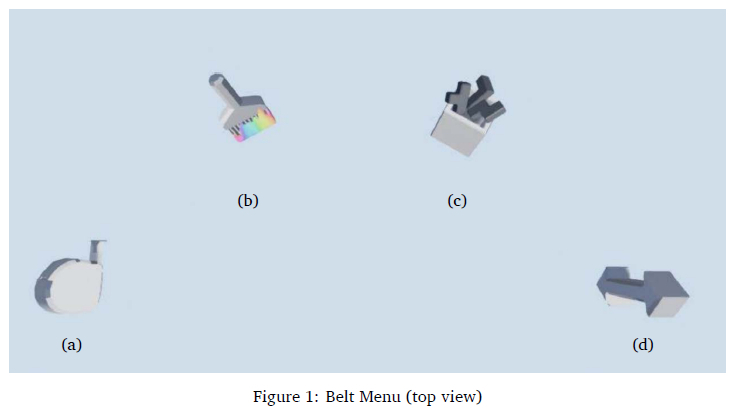
Various menu items represented functions that were provided through the Belt Menu: creating blocks of different shapes, a colouring tool, and a resizing tool. Since a belt is usually worn around the waist and it could not be assumed that all participants would be the same height, a function was also provided to adjust the height of the belt to the participant's comfort. Based on these facts, the following main menu items were provided (as shown in Figure 1:
• Measure tape Figure 1(a) - measurement is commonly used to determine the size of objects. This menu item provides tools used for changing the size of the blocks.
• Paintbrush Figure 1(b) - this represents a tool that is commonly used to apply colour to objects. This menu item provides different colours to apply to the blocks.
• Box of blocks Figure 1(c) - this represents a box from which blocks of different shapes can be retrieved.
• Arrow adjuster Figure 1(d) - this indicates the direction in which the Belt Menu can be moved. This tool is used to adjust the height of the Belt Menu.
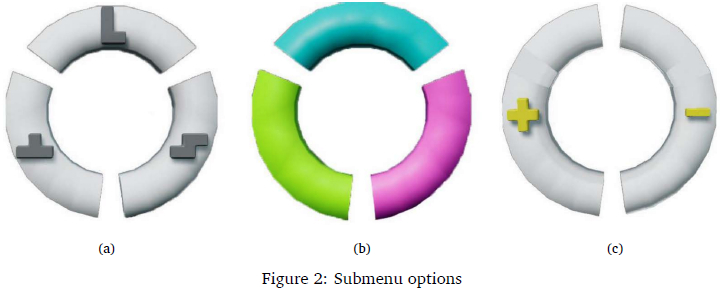
Each menu item also provided submenu items where more specific options can be selected. These options are described in the list below. All submenu options were shaped as wheel segments since studies have shown that a radial layout for menus allows for faster selections as all menu items are equidistant from the point of activation (Lediaeva & LaViola, 2020), i.e., the centre and the wheel segments provided large and easy targets to select. The main menu items had the following submenu options:
• Box of blocks - options to select three different shaped blocks (L |T | Z), as shown in Figure 2(a).
• Paintbrush - options to select three different coloured paintbrushes (turquoise | lime pink), as shown in Figure 2(b).
• Measure tape - options to select either tool for enlarging ( + ) or shrinking (-), as shown in Figure 2(c).
• Of the four menu items, the arrow adjuster was the only main menu item that did not have submenu items as it was a tool to adjust the height of the Belt Menu.
In addition to visual representation, the motion-tracked controller vibrated when touching menu items to provide haptic feedback in addition to visual feedback. The haptic feedback was provided in two ways: when touching main menu items, e.g., paintbrush, the controller would have a continuous but subtle vibration, offering a consistent tactile sensation to indicate contact; upon touching submenu items, e.g., the lime wheel segment, the controller would have a short but distinct vibration mimicking the sensation of lightly bumping a solid object to signal a change in interaction. These two different vibrations were designed to help distinguish between touching main menu items and submenu items.
To support users in developing familiarity with menu items, the Belt Menu featured consistent design elements, such as submenu items arranged like wheel segments, and incorporated haptic feedback as additional guidance. These features were provided to support users in developing habitual movements, enabling more intuitive interactions and allowing efficient navigation even without visual focus.
3.3 Procedure
To explore user behaviours with the new menu system, participants completed tasks using the Belt Menu across three separate sessions (indicated as S1, S2, and S3) that were progressively more complex. This multi-session design enabled the analysis of changes in behaviours that indicated familiarity and expertise over time, with data from each session providing insights into participants' progression. Each usability test session had a maximum duration of 30 minutes and consisted of two main sections: participants first used the Belt Menu to complete a task while their interactions were observed (10 minutes), followed by an interview to discuss their experience (20 minutes).
Observations captured real-time details of an activity (Flick, 2009), i.e., interactions with the menu system, while the think-aloud protocol encouraged participants to verbalise their thoughts during the interaction, providing a moment-by-moment account of their experiences (Pickard, 2019). Although observations usually cause participants to feel self-conscious (Rogers et al., 2023), the use of an HMD in a virtual environment concealed the researcher and possibly reduced this discomfort (Bowman & McMahan, 2007).
Interviews after each session provided deeper insights into participants' personal experiences (Flick, 2009). Participants were asked how they located menu items, their awareness of indicators such as haptic feedback, and whether the locations of menu items were easy to remember. These questions, detailed in Appendices A and B, were designed to track behavioural changes and the progression of expertise. Notes were taken during each interview session.
At the start of the first session, participants were given time to interact freely with the Belt Menu to familiarise themselves with its functions. During this exploration phase, they were encouraged to select and experiment with various menu items to understand the tools available to them. This preparatory interaction ensured that participants had a foundational understanding of the Belt Menu before using it to complete the required tasks in each session.
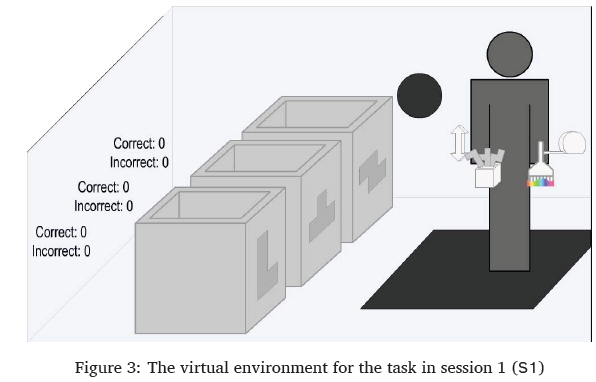
The task to be completed required five blocks to be correctly placed in three boxes by matching the block with the label on the side of the designated boxes. The Belt Menu provided tools to generate blocks of three different shapes as well as tools to change different properties i.e., colour and size (as shown in Figure 2) of these blocks. Five blocks of each shape needed to be placed in the correct box to complete the task, resulting in a total of 15 blocks correctly placed. As each block is correctly placed in each box, the label on the side would randomly generate a new requirement of colour and shape for the next block to be matched and placed.
In session 1 (S1), the task was to match and place blocks of different shapes into boxes labelled with a specific shape (as shown in Figure 3 In this session, tools for changing the colour and size were unnecessary for completing the task but these tools were still made available.
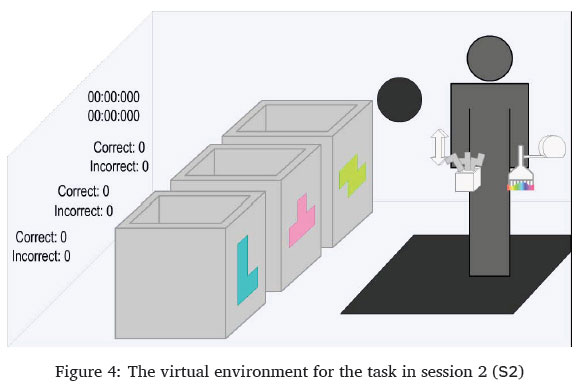
The task for session 2 (S2) was to do the same as in session 1, but additionally, the blocks would need to be in the correct shape (as shown in Figure 4.
The task for session 3 (S3) was to correctly match the shape, colour, and size of blocks that are to be placed into boxes (as shown in Figure 5.
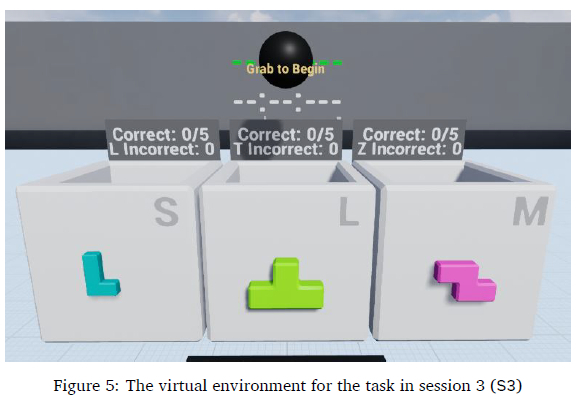
The system utilised built-in performance tracking to record task completion times and menu item selections. While the number of correct and incorrect blocks placed per box was recorded, this served only to inform participants of their progress, not as a performance metric. Task timing began when participants stood on the black pad and grabbed the black sphere (Figure 5, ensuring they were positioned correctly and familiarised with grab interactions. Timing ended once five blocks of each shape were correctly placed in the corresponding boxes.
Selection accuracy was determined by differentiating each selection as either successful or unsuccessful and was recorded as follows:
• Successful selections: Occurred when participants touched and grabbed a menu item, leading to a submenu opening or an item being selected.
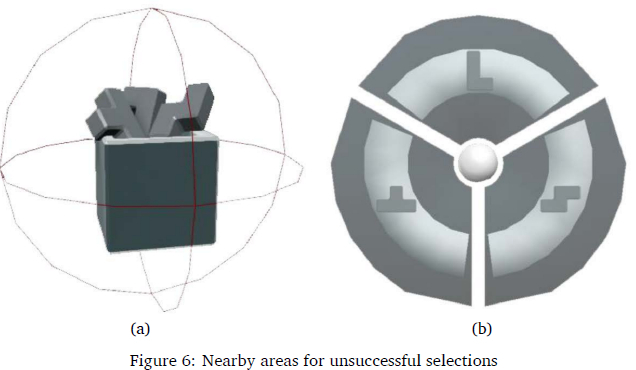
• Unsuccessful selections: Occurred when a grab was attempted near a menu item but did not result in a selection.
The system identified successful and unsuccessful selections using detection areas around each main menu and submenu item (shown in Figure 6. These detection areas, represented by lines and grey areas during development, were hidden from participants during usability testing.
Selections were recorded only while the timer was active, ensuring that any actions outside the task were excluded from the menu item selection counts. Although the system utilised built-in performance tracking for selections, these records alone were considered insufficient for accurate analysis; further steps to ensure reliability are detailed in Section 4.
After completing all sessions, participants joined focus groups to reflect on their experiences and share insights. These discussions encouraged critical thinking by allowing participants to compare their experiences with those of others who interacted with the Belt Menu (Lunenburg & Irby, 2008). To ensure consistency and comparability across focus group discussions, an identical set of facilitation questions was used for each session. The complete question set is provided in Appendices A and B.
4 RESULTS
The results in this section draw from observations, interviews, and focus groups to analyse user behaviours and individual experiences with the Belt Menu. To complement these qualitative insights, quantitative performance data were also incorporated to validate reported experiences from a perspective beyond self-reporting.
4.1 Overall user behaviour related to expertise
The data collected from the observations, interviews, and focus groups were transcribed and imported into ATLAS.ti 22 for qualitative analysis to identify recurring themes and relationships between these themes.
Thematic analysis was used to identify user behaviours as various codes listed in Table 2. As discussed in Section 2.5, user behaviours can be related to different levels of expertise, namely: novice-, experienced-, and expert users. Therefore, these levels of expertise were used as a priori set of themes to code user behaviours across all 17 participants rather than segregating participants according to expertise. This approach ensured that the focus of this study remained on various user behaviours guided by the lens of understanding these behaviours according to expertise.
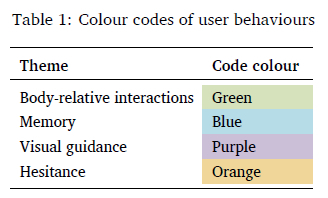
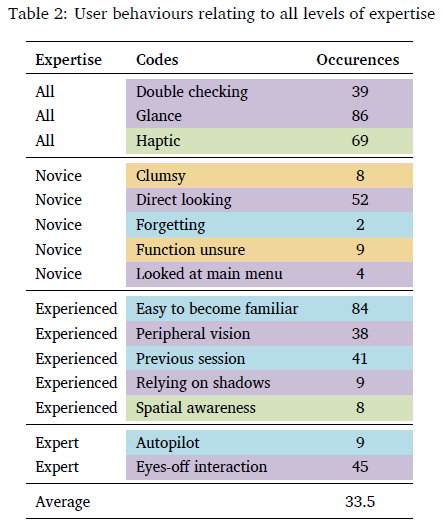
A total of 54 transcriptions (3 interviews per 17 participants plus 3 focus groups) were manually reviewed by the primary researcher to identify relevant discussions. This continuous review process allowed codes to emerge and evolve throughout the analysis to ensure accurate data representation. The process continued until all data were reviewed and no new codes emerged. User behaviours were then colour-coded based on three themes: body-relative interactions, memory, and visual guidance, as shown in Table 1. The first two themes were identified in the literature as supporting proprioception (as discussed in Section 2.4), while visual guidance has been linked to levels of expertise.
The colour coding applied to Table 2 also revealed the variety of codes identified that related to specific themes. Themes relating to body-relative interactions (orange colour coding) had little variety, with only two user behaviours coded, but they were acknowledged to help with menu selections. User behaviours relating to memory (blue colour coding) were identified evenly across all three levels of expertise with no overlapping behaviours that all expertise experienced. However, most of the discussions occurred with experienced user behaviour, which was indicated by the number of occurrences being above the average of occurrences. There was a good variety of coded user behaviours identified (seven) that were associated with visual guidance (purple colour coding). This variety was also evenly distributed across the different levels of expertise with two codes found across all three expertise levels except for expert user behaviour where only one user-behaviour was identified.
The colour coding applied to Table 2 also revealed the variety of codes identified that related to specific themes. Themes relating to body-relative interactions (orange colour coding) had little variety, with only two user behaviours coded, but they were acknowledged to help with menu selections. User behaviours relating to memory (blue colour coding) were identified evenly across all three levels of expertise with no overlapping behaviours that all expertise experienced. However, most of the discussions occurred with experienced user behaviour, which was indicated by the number of occurrences being above the average of occurrences. There was a good variety of coded user behaviours identified (seven) that were associated with visual guidance (purple colour coding). This variety was also evenly distributed across the different levels of expertise with two codes found across all three expertise levels except for expert user behaviour where only one user-behaviour was identified.
All participants were generally expected to exhibit novice behaviour in session 1 since this was their first time using the Belt Menu. In session 2, user behaviours were investigated to identify any resemblance of associative behaviour, i.e., having some established knowledge and exploring new ways to improve their interactions. In session 3, user behaviours were investigated to identify any resemblance of autonomy that is prevalent among experts, i.e., instinctive interactions with little attention required. Some behaviours were prevalent during all three sessions even though progression in expertise could be observed. The behaviours that were prevalent in all sessions are listed in Table 2 and labelled as "All". The themes of various user behaviours identified and listed in Table 1 will be discussed below. The order of these discussions begins with more general observations regarding expertise and narrows down the focus towards themes that inform the use of proprioception and visual guidance thereby, linking back to addressing the research questions.
4.2 User performance
User performance data were collected to complement observations and self-reporting by offer-ing additional insights into user behaviour. The focus was on measuring individual progression in expertise rather than comparing participants. This section highlights data from sessions 1 and 3, showcasing participants' initial and final interactions with the Belt Menu.
Two performance metrics were analysed: task completion time and selection accuracy. Task completion time was recorded in every session to evaluate efficiency. As tasks became progressively more complex across sessions, longer completion times were anticipated. The median times for each session were as follows:
• Session 1 - 00:33.362
• Session 2- 00:54.031
• Session 3- 01:37.744
The median was used to minimise the influence of outliers and ensure a fair comparison across the three sessions. As each session introduced additional tools, task complexity increased, leading to expected completion time increases, roughly doubling in session 2 and tripling in session 3. Selection accuracy was determined by successful or unsuccessful selections, as discussed in Section 3.3. However, this metric does not account for successful but incorrect selections, such as selecting the wrong size or colour, e.g., choosing a small pink L-shaped block instead of the required large lime one.
Therefore, to accurately assess selection data, an ideal benchmark for required selections was established. In session 1, participants needed to place five blocks of each shape (L, T, Z) into the correct boxes, totalling 15 blocks. Generating each block required two selections: one from the main menu (box blocks) and one from the submenu (wheel segment for a shape), resulting in the minimum required selections (MRS) being 30. Any selections beyond this would be considered unnecessary, leading to inefficiency. Unnecessary selections could arise from selecting the wrong menu item or changing a block's colour unnecessarily. These additional selections, while counted as successful, were included in the total number of selections (TNS). This TNS is also the total for all 17 participants for each of the three sessions, and therefore, the MRS should then also be multiplied by 17 sessions. The following formula was used to calculate the percentage of unnecessary selections:

This formula calculates inaccuracy to measure how selections contributed expertise progression over the three sessions. Figure 7shows the percentage of unnecessary selections, and the trend, for sessions 1 to 3.
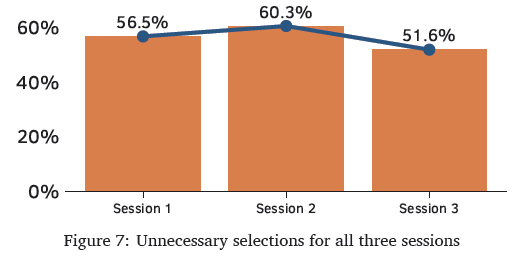
For session 2, the task required an added selection for the paintbrush tool, doubling the required selections, resulting in 60 (15x4). The task for session 3, which required both colour and size adjustments, tripled the selections to 90 (15x6). Despite the task in session 3 being more than three times as complex as in session 1, the percentage of unnecessary selections decreased from 56.51% to 51.65% (a 4.86% reduction), indicating improved efficiency. This suggests participants became more familiar with the Belt Menu, likely developing expert user behaviours that enhanced their performance.
The user performance data discussed above regarding completion time and accuracy both indicated positive evidence that participants felt more familiar with the Belt Menu and were able to increase efficiency as a result.
4.3 Hesitance
Hesitance, as exhibited by participants, refers to uncertainty about what action to take or how to perform it. For example, a participant might look at a menu item resembling a measuring tape but pause to contemplate the function it represents. The following discussion examines the causes of this user behaviour as observed during interactions with the Belt Menu.
In session 1, participants often felt clumsy with their interactions if they were not intentionally focusing on their selections, specifically with main menu items. During the interviews. Participants P02 and P10 discussed that they were unsure of some menu items' functions at first, especially the measuring tape, but were able understand the function once they started using them. Participant P02 said: "Measuring tape (ruler) is more to measure length than size." and that they "... would've preferred a block with arrows going up and down. There could be a more elegant solution. [It] can be better thought out".
Participants P14 and P17 stated that they understood the function of the paintbrush but were unsure how to use this tool. During their session 1, participant P14 tried to use the paintbrush on multiple virtual objects, including the boxes and other menu items, before using them on the blocks. All 17 participants also mentioned that they struggled to remember the specific positions of the submenu for the different shapes so they had to look at the menu items before selecting the blocks from the Belt Menu.
This behaviour indicated unfamiliarity and served as a baseline for recording user behaviour. While it does not directly address the research questions, it establishes a reference point for tracking potential changes in familiarity over future sessions.
4.4 Haptic feedback
Haptic feedback, in this context, refers to the vibrations generated by the controller during interactions with the Belt Menu. The discussion below explores the user behaviours influenced by this feedback, as well as its impact on their impressions of the Belt Menu and its role in assisting them with task completion across sessions.
Even though haptic feedback was designed to provide feedback in addition to visual feedback, only some participants mentioned that they noticed the controllers "buzzing", i.e., providing haptic feedback, when touching menu items. Participant P14 in particular found this as a helpful confirmation to indicate that they touched the menu items by stating that the haptic feedback "gives a good feeling that you [have] really touched it. It gives an idea that you already reached there. Not a very hard vibration. [The vibration] makes it more real.". Others (P05, P11, P16, P17) stated that the "buzzing" was annoying and sometimes made them feel overwhelmed. In post-session focus groups, participants noted that haptic feedback might carry a negative connotation, as some video games use it to signal errors, such as crashing or taking damage. Participant P11 was aware of this connotation before being prompted and made a mental shift between sessions 1 and 2, leading them to use the haptic feedback to help them feel the menu items. Some other participants (P01, P06, P07, P08, P10) confirmed during the interviews and focus group discussions that they were only confident of their actions without looking because the controller provided haptic feedback when touching menu items.
In contrast, participant P03 stated "I couldn't recall after a session whether the controllers vibrated or not or anything highlighted. I just waved in the direction of whatever I wanted" which suggested that they did not rely on non-visual cues but instead relied only on well-practised movement and memory.
To summarise, haptic feedback was incorporated as a complementary cue for visual representation. Discussions with participants provide a variety of evidence regarding the use of haptic feedback to support menu item selection. This design directly aligns with research sub-question SQ2, which partly examines how haptic feedback influences user behaviours. The findings regarding haptics revealed three distinct user sentiments: helpful, annoying, and unnoticed.
4.5 Body-relative interactions and memory
This section examines user behaviours resulting from having all menu items positioned within close proximity, i.e., within arm's reach, and explores how this arrangement contributed to their ability to recall the location of each function.
In session 1, all participants found the task straightforward, enabling them to repeatedly practice interactions with the Belt Menu. In session 2, they easily adapted to using the paintbrush, as its layout and selection mirrored prior interactions. Participant feedback, such as "Yes, the previous session helped a lot for feeling familiar with the menu system today" (Participant P10), indicated that familiarity and memory from prior sessions contributed to their ease of use. Participant P16 similarly expressed "Today's session I did not have to figure things out and just go ahead and use it. So that experience did help".
During interviews, participants consistently stated that exposure in previous sessions made the Belt Menu more intuitive, helping them better recall submenu item positions in session 2. This progression reflects the movement from novice to experienced users, aligning with the associative stage of expertise. Session 3 required the use of all menu items, demanding participants to resize and recolour blocks before placement, which involved frequent switching between tools. Despite this complexity, participants focused on task completion rather than learning new interactions. Many participants (P01, P04, P08, P10) reported feeling confident and efficient, with selections described as feeling like "autopilot." Participant P01 stated, "I naturally just waved my hand into the option that I wanted," and Participant P17 noted, "I instinctively moved my hand into the right position." Several participants (P01, P03, P06, P07, P08, P10) reported performing eyes-off interactions, i.e., selecting items without looking, especially in general directions or when using submenu items. These behaviours reflect proficiency, as users required minimal attention for menu interactions, achieving a level of autonomy.
The evidence presented in this section on body-relative interactions and memory contributes to understanding how familiarity with nearby virtual objects can be established within a virtual environment, as outlined in research sub-question SQ1.
4.6 Reliance on visual guidance
This section discusses various user behaviours related to the use of visual cues for navigating the Belt Menu.
In session 1, all participants took time to familiarise themselves with the Belt Menu, carefully observing each menu item's feedback, such as blocks changing colour when touched with a paintbrush, and interacting with other objects. This behaviour aligns with the novice cognitive stage, where users intentionally learn system interactions.
In session 2, new behaviours emerged where participants P04, P05, P07, P10, P15, P16, and P17 frequently glanced at their selections to confirm choices, often noticing submenu items from "the corner of [their] eye", i.e., their peripheral vision. Participants P02, P14, and P15, who preferred to inspect every interaction, reported that as tasks became more complex, they relied even more on visual confirmation. They noted this behaviour also extended to their everyday routines.
During the focus groups, participants P04, P05, P07, P15, and P17 discussed how selecting submenu items felt easier with less visual guidance compared to main menu items. Observational data corroborates this by showing that participants typically glanced at the main menu items before focusing on finalising selections in the submenu. This behaviour indicates that, with experience, participants relied less on visual cues, often without conscious awareness. However, the exact reasons for this shift in reliance could not be conclusively determined from the data.
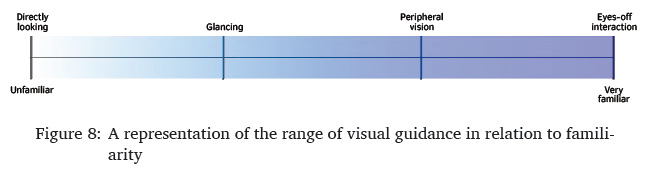
Previous studies have shown that as users gain expertise, they rely less on visual guidance, with expert users performing eyes-off interactions (Cockburn et al., 2014; Ericsson & Harwell, 2019; Schramm et al., 2016). Consistent with these findings, participants in earlier sessions carefully monitored each interaction with the Belt Menu, often looking directly at menu items. As familiarity grew, participants became more confident, initially glancing, and then using peripheral vision to confirm selections. Eventually, participants reached a stage where they could select items without relying on sight, demonstrating eyes-off interaction. Observing these behaviours resulted in identifying four categories of user behaviours regarding visual guidance: directly looking, glancing, peripheral vision, and eyes-off interaction (as shown in Table 2 in Section 4.1). Overall, the results showed that increased familiarity allowed participants to use a broader range of visual guidance strategies. Figure 8illustrates how these categories correspond to varying levels of familiarity.
The findings on visual guidance in this section contribute to understanding user behaviours that reflect the development of familiarity with virtual objects in a virtual environment, addressing research sub-questions SQ1 and SQ2. Additionally, they provide evidence of how visual cues support the use of proprioception in menu item selection, further addressing sub-question SQ2.
4.7 Use of shadows
The following discussionoutlines howuserbehaviouremerged fromparticipants noticing shadows in the virtual environment, which enhanced their awareness of menu items to be selected.
Shadows in the virtual environment were intended solely for realism, yet three participants used them to locate and interact with menu items. This suggests that shadows could function beyond aesthetics, similar to physical environments that indicate object presence and movement.
In session 2, participants P08 and P10 noticed shadows cast by the menu items and their virtual hands, which helped guide their selections when they were not looking directly at the menu. Participant P10 noted, "Having the shadows really helped understand where everything is without looking directly at the menu items." Participant P05 also observed the shadows, which helped them identify two menu items (measure tape, arrow adjuster) that were out of sight when looking forward.
The discussion on how shadows aid in menu item awareness highlights that indirect perceptual properties can support interactions within a virtual menu system, addressing research sub-question SQ2.
4.8 Concluding user behaviours
The results stated above provide evidence that participants were unfamiliar with the Belt Menu at first but as they progressed over three sessions, they noticed more aspects of the Belt Menu and became more familiar over time. This can be expected, however, the changes in the user behaviours linked to the progression of familiarity are of particular interest.
The Belt Menu's close proximity to the user significantly enhanced accessibility and memory, enabling participants to select menu items intuitively. While haptic feedback was intended to support awareness, its effectiveness varied among users. Notably, visual cues were central to interaction, with behaviours ranging from direct looking to eyes-off interactions evolving as familiarity increased. Additionally, some participants leveraged shadows as an unanticipated cue to locate menu items. These findings suggest that integrating multiple feedback mechanisms, particularly those that enhance visual guidance, can foster familiarity and support more efficient, intuitive interaction with VR menu systems.
5 DISCUSSION
The results above highlighted user behaviours that were identified and linked to progression in expertise. These user behaviours were analysed further to address the research questions posed in Section 1. The first two subsections below provide discussions that address supporting research questions. Based on these two subsections, the main research question will be addressed.
5.1 Addressing supporting question SQ1
How can spatial awareness and familiarity with menu items be developed in a virtual environment?
Because proprioception is a sense of spatial awareness and familiarity with the space and objects around an individual, it is important to discuss how this sense can be supported. The Belt Menu was intentionally designed to have menu items around the user's body, which is a space that the user will already find familiar and virtual objects in this space will always be accessible.
This study suggests that, while participants initially showed hesitation in the first session, they developed familiarity with menu item positions around their body through practice, improving memory and recall in subsequent sessions. Using the lens of user behaviours associated with the levels of expertise as discussed in Section 2.5; the results of this study yielded similar evidence with the Belt Menu as well, inferring that familiarity can be developed with a menu system within close proximity in a virtual environment. Through practice, participants developed instinctive selection movements, a key indicator of expert behaviour. This progression of familiarity was further evident as some participants reduced their reliance on visual guidance as they grew more familiar with the menu system. In addition to the evidence extracted from user behaviour, the performance data for time completion and selection accuracy provides evidence of familiarity as these showed increased efficiency over sessions.
The instinctive selection of menu items, requiring minimal conscious effort, indicates that participants have developed a robust sense of spatial awareness around their body. Learning and memorising menu items were further supported by haptic feedback, as discussed in the next supporting question.
5.2 Addressing supporting question SQ2
How can visual cues and haptic feedback support the use of proprioception to interact with menu items?
When interacting with a virtual environment, one of the most salient forms of feedback for interaction with virtual objects is visual feedback, e.g., selecting a menu item results in a tool that is visibly selected and placed in the user's hand. Visual feedback enables users to associate a function with its spatial position, thereby enhancing memory retention. This effect is particularly evident among novice users, who rely more heavily on visual cues during the earlier sessions. An unexpected user behaviour relating to the use of visual feedback was identified, which was the use of shadows. Because shadows behave in the same way in a virtual environment, some participants realised that they could rely on the virtual shadows to guide their hands toward menu items for selections when menu items were not in sight. Therefore, shadows can be used as visual information for users to be aware of their virtual surroundings as well. Although this visual cue was used in an unintended way, this still provides evidence that visual cues support the use of proprioception for interacting with a menu system.
A less prominent form of feedback that was mostly used to supplement other forms of feedback is haptics. While haptic feedback was used in the Belt Menu to create awareness of menu items when they are touched, evidence shows that there were four sentiments: some found it to be informative, annoying, unnoticed, or preferred to rely on practised movement and memory instead. Based on these results, haptic feedback is not essential for menu system design, but it can enhance users' awareness of nearby menu items during hand movements, complementing visual guidance.
The results also suggest that there is a range of user behaviours that were identified with regard to the reliance on visual feedback to guide menu item selection. These findings are further discussed in the next subsection to address the primary research question.
5.3 Addressing the main research question
What is the relationship between proprioception and reliance on visual guidance with regard to menu item selection?
One of the key findings discussed in the results is that as familiarity with the menu system increases, users rely less on visual cues when selecting menu items. Two additional user behaviours were observed to extend this understanding further. First, some participants felt more confident selecting main menu items without looking but were less confident with submenu items, likely because selecting a submenu finalises the action, requiring more care. Another possibility is that submenu item selections are less practised since they require first selecting a main menu item. Second, some participants always looked at selections to reduce error, indicating a personal preference. This could relate to the "paradox of the active user" (Carroll & Rosson, 1987), where users resist adopting more efficient methods due to the risk of temporary performance dips.
Overall, user behaviours regarding visual guidance appear more tied to personal preference than expertise progression. Participants in later sessions had more experience, helping them to rely less on visual guidance, resulting in them using visual cues in a broader range of ways. For example, an experienced user might focus directly on a primary menu item while quickly glancing at submenu options. They also rely on peripheral vision to stay aware of additional choices and can even select another menu item with their other hand without looking, demonstrating all four categories of visual guidance.
In contrast, less experienced users are more restricted in using visual guidance, relying on it more consistently. However, this trend is not universal because some experienced users still prefer to look at selections to ensure success.
These results thus suggest that placing menu items close to the body enhances memorability and accessibility, making selection more intuitive in virtual environments. Familiarity with the interface develops through visual and haptic feedback, with haptic feedback as a supplementary role. Visual guidance is key in developing proprioception, allowing users to locate menu items near their body. Users' reliance on visual feedback decreases as they become more familiar with the menu, ultimately enabling more efficient, eyes-off interaction.
Familiarity aids proprioception in menu selection, with visual guidance helping memorise the locations of virtual objects. Over time, as spatial awareness improves, users rely less on visual cues, further supporting proprioception in selecting menu items.
5.4 Limitations
By taking a qualitative approach, this study focused on insight extracted from the experience of individuals, thus making the outcomes of this study non-generalisable by nature. Making use of this approach also inherently made use of a small sample size as the focus of the study was based on understanding the richness of the experiences.
The researchers were not permitted to collect basic demographics such as age or gender data due to institutional ethics policies; therefore, any inferences that could be based on such data were not possible. Additionally, since recruitment criteria included experience with video games, the study did not explore the learnability of the Belt Menu for users with lower technological proficiency than the included participants.
Bimanual interaction, i.e., the use of two hands for interactions, was acknowledged as part of this study since the Belt Menu required the use of both hands. Although hand dominance was investigated as part of a larger study (Ka et al., 2023), it is not extensively discussed here since it was not the focus of this study.
The validity of the data analysis was supported through triangulation by incorporating multiple forms of data collection. However, the study's outcomes could have been further improved by employing additional reliability measures, such as inter-rater reliability.
5.5 Implications and future work
This study highlights a direct link between visual guidance and proprioception in supporting menu item selection within immersive virtual environments. The findings of this study suggest that developing spatial awareness through well-practised movements is more important than haptic feedback for fostering proprioception. Findings showed that reduced reliance on visual guidance complemented proprioception in selecting menu items. These insights provide a foundation for future studies to use visual guidance categories to better understand user interactions with menu systems in 3D environments. Future studies can build on these findings by conducting research that quantitatively measures user performance, establishing a benchmark for comparison with other menu systems in immersive virtual environments.
The Belt Menu was designed for forward-facing tasks, but future studies could explore body-tracking menu systems for multi-directional movement, such as rotating utility belts in VR games, to enhance menu selection through proprioception. Since multi-directional tasks are likely more complex, future studies can use this condition to test the Belt Menu's feasibility in supporting users with intricate tasks, providing empirical insights into its effectiveness.
Some participants noted that menu items obstructed their view, particularly when the Belt Menu was positioned too high. While adjusting the height resolves this, a more innovative solution could involve dynamically adjusting the transparency of menu items based on the proximity of the user's hands. Exploring such designs could yield valuable insights into the optimal distance from the user's body, which could help determine when this approach becomes necessary to prevent visual obstruction.
An unexpected finding from this study was participants leveraging shadows to enhance selection and awareness in an immersive virtual environment. This suggests that shadows may serve purposes beyond increasing realism, potentially improving interaction design. Since this study focused on selection within arm's reach, future research could explore how shadows guide selection techniques beyond this range, such as the Go-Go Interaction Technique (Poupyrev et al., 1996), where shadows remain visible even when the virtual hand is obscured.
6 CONCLUSION
This study set out to investigate the relationship between proprioception and visual guidance and how these two senses can be used to support menu item selection in a 3D virtual environment. To do so, a menu system was created using concepts identified from existing literature, which included body-relative interactions, user behaviours relating to expertise, and levels of expertise relating to the use of visual guidance. This menu system was then used by participants in several usability test sessions so that their user experiences and behaviours could be investigated for progress over time.
The results provided evidence that participants primarily relied on experience and well-practised movements to establish spatial awareness and familiarity with menu items, which allowed them to rely less on visual guidance. Furthermore, with regards to reliance on visual guidance, the findings built on existing literature by identifying a range of four categories: directly looking, glancing, use of peripheral vision, and eyes-off interaction. This range was inversely related to familiarity, with a strong reliance on visual guidance when users were unfamiliar with the system. As familiarity increased, users transitioned toward proprioceptive interaction, enabling more intuitive menu selection from a body-centred interface.
7 ACKNOWLEDGMENTS
This research utilised ChatGPT versions 3.5 and 4 to enhance the clarity and phrasing of the written work. This was done by the author writing the discussion in their own words and then using ChatGPT to rephrase the written work. However, all content remains the original conceptual work of the authors, and ChatGPT was not used to generate any original text.
References
Ahmed, N., Lataifeh, M., & Junejo, I. (2021). Visual pseudo haptics for a dynamic squeeze/grab gesture in immersive virtual reality. 2021 IEEE 2nd International Conference on Human-Machine Systems (ICHMS), 1-4. https://doi.org/10.1016/j.cag.2012.12.00310.1109/ICHMS53169.2021.9582654
Argelaguet, F., & Andujar, C. (2013). A survey of 3D object selection techniques for virtual environments. Computers & Graphics, 37(3), 121-136. https://doi.org/10.1016/j.cag.2012.12.003 [ Links ]
Bailly, G., Lecolinet, E., & Nigay, L. (2016). Visual menu techniques. ACM Computing Surveys, 49(4), 1-41. https://dl.acm.org/doi/10.1145/3002171 [ Links ]
Barnum, C. M. (2010). Usability testing essentials: Ready, set ... test! Elsevier. https://www.sciencedirect.com/book/9780123750921/usability-testing-essentials
Bernard, C., Monnoyer, J., Ystad, S., & Wiertlewski, M. (2022). Eyes-off your fingers: Gradual surface haptic feedback improves eyes-free touchscreen interaction. CHI Conference on HumanFactors in Computing Systems, 1-10. https://doi.org/10.1145/3491102.3501872
Boeck, J. D., Raymaekers, C., & Coninx, K. (2006). Exploiting proprioception to improve haptic interaction in a virtual environment. Presence: Teleoperators and Virtual Environments, 15(6), 627-636. https://doi.org/10.1162/pres.15.6.627 [ Links ]
Bowman, D. A., & McMahan, R. P. (2007). Virtual reality: How much immersion is enough? IEEEXplore, Computer, 40(7), 36-43. https://doi.org/10.1109/MC.2007.257 [ Links ]
Bowman, D. A., & Wingrave, C. A. (2001). Design and evaluation of menu systems for immersive virtual environments. Proceedings IEEE Virtual Reality 2001, 149-156. https://doi.org/10.1109/VR.2001.913781
Bragdon, A., Nelson, E., Li, Y., & Hinckley, K. (2011). Experimental analysis of touch-screen gesture designs in mobile environments. Proceedings of the SIGCHI Conference on Human Factors in Computing Systems, 403-412. https://doi.org/10.1145/1978942.1979000
Calleja, G. (2011). In-game: From immersion to incorporation. MIT Press. https://direct.mit.edu/books/monograph/2889/In-GameFrom-Immersion-to-Incorporation
Carroll, J. M., & Rosson, M. B. (1987). Paradox of the active user. In J. M. Carroll (Ed.), Interfacing thought: Cognitive aspects ofhuman-computer interaction (pp. 80-111). MIT Press. http://dl.acm.org/citation.cfm?id=28446.28451
Cazañas, A., de San Miguel, A., Parra, E., Cazañas, A., de San Miguel, A., & Parra, E. (2017). Estimating sample size for usability testing. Enfoque UTE, 8, 172-185. https://doi.org/10.29019/enfoqueute.v8n1.126 [ Links ]
Chertoff, D. B., Byers, R. W., & LaViola, J. J. (2009). An exploration of menu techniques using a 3D game input device. Proceedings of the 4th International Conference on Foundations of Digital Games, 256-262. https://doi.org/10.1145/1536513.1536559
Cockburn, A., Gutwin, C., & Greenberg, S. (2007). A predictive model of menu performance. Conference on Human Factors in Computing Systems - Proceedings, 627-636. https://doi.org/10.1145/1240624.1240723
Cockburn, A., Gutwin, C., Scarr, J., & Malacria, S. (2014). Supporting novice to expert transitions in user interfaces. ACM Computing Surveys, 47(2), 31:1-31:36. https://doi.org/10.1145/2659796 [ Links ]
Dachselt, R., & Hübner, A. (2007). Three-dimensional menus: A survey and taxonomy. Computers & Graphics, 31(1), 53-65. https://doi.org/10.1016/J.CAG.2006.09.006 [ Links ]
Ericsson, K. A., & Harwell, K. W. (2019). Deliberate practice and proposed limits on the effects of practice on the acquisition of expert performance: Why the original definition matters and recommendations for future research. Frontiers in Psychology, 10, 1-19. https://doi.org/10.3389/fpsyg.2019.02396 [ Links ]
Eriksson, M. (2016). Reaching out to grasp in virtual reality: A qualitative usability evaluation of interaction techniques for selection and manipulation in a VR game [Masters thesis]. KTH Royal Institute of Technology. Retrieved October 31, 2017, from http://www.diva-portal.org/smash/record.jsf?pid=diva2:946219
Faulkner, L. (2003). Beyond the five-user assumption: Benefits of increased sample sizes in usability testing. Behavior Research Methods, Instruments, & Computers, 35(3), 379-383. https://doi.org/10.3758/BF03195514 [ Links ]
Fitts, P. M., & Posner, M. I. (1967). Human performance (2nd ed.). Brooks/Cole Publishing Company. https://books.google.co.za/books/about/Human_Performance.html?id=XtFOAAAAMAAJ
Flick, U. (2009). An introduction to qualitative research (4th ed.). SAGE. https://books.google.co.za/books/about/An_Introduction_to_Qualitative_Research.html?id=bn73UEA3thIC
Foley, J. D., Wallace, V. L., & Chan, P. (1984). Human factors of computer graphics interaction techniques. IEEE Computer Graphics and Applications, 4(11), 13-48. https://doi.org/10.1109/MCG.1984.6429355 [ Links ]
Guest, G., Bunce, A., & Johnson, L. (2006). How many interviews are enough?: An experiment with data saturation and variability. Field Methods, 18(1), 59-82. https://doi.org/10.1177/1525822X05279903 [ Links ]
Hall, E. T., Birdwhistell, R. L., Bock, B., Bohannan, P., Diebold, Durbin, M., Edmonson, M. S., Fischer, J. L., Hymes, D., Kimball, S. T., La Barre, W., McClellan, J. E., Marshall, D. S., Milner, G. B., Sarles, H. B., Trager, G. L., & Vayda, A. P. (1968). Proxemics [and comments and replies]. Current Anthropology, 9(2), 83-108. https://doi.org/10.1086/200975 [ Links ]
Hofman, K., Walters, G., & Hughes, K. (2022). The effectiveness of virtual vs real-life marine tourism experiences in encouraging conservation behaviour. Journal of Sustainable Tourism, 30(4), 742-766. https://doi.org/10.1080/09669582.2021.1884690 [ Links ]
Jakobsen, M. R., & Hornak, K. (2007). Transient visualizations. Proceedings of the 19th Australasian Conference on Computer-Human Interaction: Entertaining User Interfaces, 69-76. https://doi.org/10.1145/1324892.1324905
Jiuwei, L., Haoyu, Y., Fei, L., & Jiede, W. (2020). Application of virtual reality technology in psychotherapy. 2020 International Conference on Intelligent Computing and Human-Computer Interaction (ICHCI), 359-362. https://doi.org/10.1109/ICHCI51889.2020.00082
Ka, K. S., Bosman, I., & Bothma, T. (2023). Using proprioception to guide menu item selection in virtual reality [Masters dissertation]. University of Pretoria. https://repository.up.ac.za/items/da0a2d1e-4f3b-4c14-a3ce-b8a87ad75982 [ Links ]
Komerska, R., & Ware, C. (2004). A study of haptic linear and pie menus in a 3D fish tank VR environment. 12th International Symposium on Haptic Interfaces for Virtual Environment and Teleoperator Systems, 224-231. https://doi.org/10.1109/HAPTIC.2004.1287200
Kugler, L. (2021). The state of virtual reality hardware. Communications of the ACM, 64(2), 15-16. https://doi.org/10.1145/3441290 [ Links ]
Kulshreshth, A., & LaViola, J. J. (2014). Exploring the usefulness of finger-based 3D gesture menu selection. Proceedings of the 32nd Annual ACM Conference on Human Factors in Computing Systems, 1093-1102. https://doi.org/10.1145/2556288.2557122
Lansberg, M. G., Legault, C., MacLellan, A., Parikh, A., Muccini, J., Mlynash, M., Kemp, S., Buckwalter, M. S., & Flavin, K. (2022). Home-based virtual reality therapy for hand recovery after stroke. PM&R, 14(3), 320-328. https://doi.org/10.1002/pmrj.12598 [ Links ]
Lediaeva, I., & LaViola, J. (2020). Evaluation of body-referenced graphical menus in virtual environments. Proceedings ofGraphics Interface 2020, 308-316. https://doi.org/10.20380/GI2020.31
Liimatainen, K., Latonen, L., Valkonen, M., Kartasalo, K., & Ruusuvuori, P. (2021). Virtual reality for 3D histology: Multi-scale visualization of organs with interactive feature exploration. BMC Cancer, 21(1), 1133. https://doi.org/10.1186/s12885-021-08542-9 [ Links ]
Lindgaard, G., & Chattratichart, J. (2007). Usability testing: What have we overlooked? Proceedings of the SIGCHI Conference on Human Factors in Computing Systems, 1415-1424. https://doi.org/10.1145/1240624.1240839
Lunenburg, F. C., & Irby, B. J. (2008). Writing a successful thesis or dissertation: Tips and strategies for students in the social and behavioral sciences. Corwin Press. https://us.sagepub.com/en-us/nam/book/writing-successful-thesis-or-dissertation
Matamala-Gomez, M., Donegan, T., Bottiroli, S., Sandrini, G., Sanchez-Vives, M. V., & Tassorelli, C. (2019). Immersive virtual reality and virtual embodiment for pain relief. Frontiers in Human Neuroscience, 13, 1-12. https://doi.org/10.3389/fnhum.2019.00279 [ Links ]
Menges, R., Kumar, C., & Staab, S. (2019). Improving user experience of eye tracking-based interaction: Introspecting and adapting interfaces. ACM Transactions on Computer-Human Interaction, 26(6), 1-46. https://doi.org/10.1145/3338844 [ Links ]
Merriam, S. B., & Tisdell, E. J. (2015). Qualitative research: A guide to design and implementation (4th ed.). John Wiley & Sons. https://books.google.co.za/books/about/Qualitative_Research.html?id=JFN_BwAAQBAJ
Mine, M. R., Brooks, F. P., & Sequin, C. H. (1997). Moving objects in space: Exploiting proprioception in virtual-environment interaction. Proceedings of the 24th Annual Conference on Computer Graphics and Interactive Techniques, 19-26. https://doi.org/10.1145/258734.258747
Mohanty, R. R., Raina, A. S., Chaudhuri, S., Quek, F., Sueda, S., & Krishnamurthy, V. R. (2022). Spatial manipulation in virtual peripersonal space: A study of motor strategies. Journal of Computing and Information Science in Engineering, 23(21004). https://doi.org/10.1115/1.4054277 [ Links ]
Moore, A., Kodeih, M., Singhania, A., Wu, A., Bashir, T., & McMahan, R. (2019). The importance of intersection disambiguation for virtual hand techniques. 2019 IEEE International Symposium on Mixed and Augmented Reality (ISMAR), 310-317. https://doi.org/10.1109/ISMAR.2019.00029
Nielsen, J., & Landauer, T. K. (1993). A mathematical model of the finding of usability problems. Proceedings of the INTERACT '93 and CHI '93 Conference on Human Factors in Computing Systems, 206-213. https://doi.org/10.1145/169059.169166
Park, S., & Kim, Y. (2022). A metaverse: Taxonomy, components, applications, and open challenges. IEEE Access, 10, 4209-4251. https://doi.org/10.1109/ACCESS.2021.3140175 [ Links ]
Petkova, V. I., & Ehrsson, H. H. (2008). If I were you: Perceptual illusion of body swapping. PLOS ONE, 3(12), 1-9. https://doi.org/10.1371/journal.pone.0003832 [ Links ]
Pickard, A. J. (2019). Research methods in information (2nd ed.). Facet Publishing. https://www.cambridge.org/core/books/research-methods-in-information/D922B9D95E51D50CDC0A7DB5C3765336
Poupyrev, I., Billinghurst, M., Weghorst, S., & Ichikawa, T. (1996). The go-go interaction technique: Non-linear mapping for direct manipulation in VR. Proceedings of the 9th Annual ACM Symposium on User Interface Software and Technology, 79-80. https://doi.org/10.1145/237091.237102
Raskin, J. (2000). The humane interface: New directions for designing interactive systems. Addison-Wesley Professional. https://www.amazon.com/Humane-Interface-Directions-Designing-Interactive/dp/0201379376
Ren, G., & O'Neill, E. (2013). 3D selection with freehand gesture. Computers & Graphics, 37(3), 101-120. https://doi.org/10.1016/j.cag.2012.12.006 [ Links ]
Rogers, Y., Sharp, H., & Preece, J. (2023). Interaction design: Beyond human-computer interaction (6th ed.). John Wiley & Sons Inc. https://www.wiley.com/en-us/Interaction+Design%3A+Beyond+Human-Computer+Interaction%2C+6th+Edition-p-9781119901099
Schmettow, M. (2012). Sample size in usability studies. Communications of the ACM, 55(4), 64-70. https://doi.org/10.1145/2133806.2133824 [ Links ]
Schneider, W., & Shiffrin, R. M. (1977). Controlled and automatic human information processing: I. Detection, search, and attention. Psychological Review, 84(1), 1-66. https://doi.org/10.1037/0033-295X.84.1.1 [ Links ]
Schramm, K., Gutwin, C., & Cockburn, A. (2016). Supporting transitions to expertise in hidden toolbars. Proceedings of the 2016 CHI Conference on Human Factors in Computing Systems, 4687-4698. https://doi.org/10.1145/2858036.2858412
Shang, W., & Alena, K. (2025). Advancements in virtual reality technology: A systematic review of user experience and application trends. Artificial Intelligence and Applications, 3(4), 341-358. https://doi.org/10.47852/BONVIEWAIA52024327 [ Links ]
Shneiderman, B. (1983). Direct manipulation: A step beyond programming languages. Computer, 16(8), 57-69. https://doi.org/10.1109/MC.1983.1654471 [ Links ]
Shneiderman, B., Plaisant, C., Cohen, M., Jacobs, S., Elmqvist, N., & Diakopoulos, N. (2018). Designing the user interface: Strategies for effective human-computer interaction (6th ed.). Pearson Education. https://www.jbe-platform.com/content/journals/10.1075/idj.17.2.14mar
Slater, M. (2018). Immersion and the illusion of presence in virtual reality. British Journal of Psychology, 109(3), 431-433. https://doi.org/10.1111/bjop.12305 [ Links ]
Sólfar Studios. (2017). Everest VR on meta rift [Accessed: 9 April 2024]. Reykjavik, Iceland. https://www.meta.com/experiences/rift/1043021355789504/
Stillman, B. C. (2002). Making sense of proprioception: The meaning of proprioception, kin-aesthesia and related terms. Physiotherapy, 88(11), 667-676. https://doi.org/10.1016/80031-9406(05)60109-5 [ Links ]
Taylor, J. L. (2009). Proprioception. In L. R. Squire (Ed.), Encyclopedia ofneuroscience (pp. 11431149). Academic Press. https://www.sciencedirect.com/science/article/pii/B9780080450469019070
Weijdom, J. (2022). Performative prototyping in collaborative mixed reality environments: An embodied design method for ideation and development in virtual reality. Proceedings of the Sixteenth International Conference on Tangible, Embedded, and Embodied Interaction, 1-13. https://doi.org/10.1145/3490149.3501316
Wickens, C. D., Helton, W. S., Hollands, J. G., & Banbury, S. (2021). Memory and training. In Engineering psychology and human performance (5th ed., pp. 273-334). Routledge. https://www.taylorfrancis.com/chapters/mono/10.4324/9781003177616-8/memory-training-christopher-wickens-william-helton-justin-hollands-simon-banbury
Wilson, A. D., & Golonka, S. (2013). Embodied cognition is not what you think it is. Frontiers in Psychology, 4. https://doi.org/10.3389/fpsyg.2013.00058 [ Links ]
Yan, Y., Yu, C., Ma, X., Huang, S., Iqbal, H., & Shi, Y. (2018). Eyes-free target acquisition in interaction space around the body for virtual reality. Proceedings of the 2018 CHI Conference on Human Factors in Computing Systems, 1-13. https://doi.org/10.1145/3173574.3173616
Zhang, Z., Sarcevic, A., & Bossen, C. (2017). Constructing common information spaces across distributed emergency medical teams. Proceedings of the 2017 ACM Conference on Computer Supported Cooperative Work and Social Computing, 934-947. https://doi.org/10.1145/2998181.2998328
Received: 30 July 2023
Accepted: 13Jun2025
Online: 22 December 2025
A INTERVIEW QUESTIONS
Participant Session
VE experience:
Navigation and layout
• Logical placement
• Working through each item
• Other Comments
SELECTION
In reach
• Were the menu items comfortably in reach?
• Did you use your dominant or non-dominant hand? Which ones did you use for certain tools?
Representation
• What indicated to you that you touched?
• Was the function of the tools obvious when you first saw them?
• What about after using them?
• Other
Visibility
• Was the state of the menu changing from menu to submenu clear?
Error recovery
• Was it easy or difficult to fix if you mistakenly selected something?
• Anything that makes you blame the system for the an incorrect selection
Easy to become familiar
• Did you find the menu system easy to become familiar with?
• Do you think your past experience with VEs (or lack thereof) contributed to you finding the menu system familiar/unfamiliar to you?
Comfort and fatigue
• Would you say that this menu system would cause more/less/equal amounts of fatigue compared to other VR interactions you've used before?
Eyes-off interaction
• Did you always look directly at the menu items when you were selecting them?
• Were there any menu items that you had to focus on more than others when selecting these menu items?
B FOCUS GROUP QUESTIONS
Focus Group
This menu system design draws inspiration from a utility belt. Utility belts provide quick access to useful tools without always looking.
1. Which part of the menu system did you enjoy using the most and why?
2. Some people pointed out that grabbing the measuring tape was difficult to perform.
(a) What are your opinions about this?
3. Some people found the vibrations to be annoying when they were just moving their hands around. It felt like they did something wrong or it just kept buzzing.
(a) How do you feel about this?
(b) Extra: buzzing due to gaming controller experience.
4. Some people would move the belt menu to a specific position and leave it there for the whole session. But others moved the belt menu more than once to adjust the positioning for specific subtasks. a. What are everyone's thoughts on this?
5. Some people would position the belt menu so that it is always visible. How do you feel about that (Extra: potential for HUD)?
6. Some people mentioned that the menu items would block their view of the size labels. a. What changes would you make to the menu system to deal with this issue?
7. The purpose of putting some menu items (e.g. measuring tape) out of direct eyesight was to see if you would try to select them without looking.
(a) Did any of you try to select menu items without looking at them?
(b) If so, what did you rely on to do so (e.g. vibrations, shadow, gesture/waving based on position remembered)?
(c) Did you try to apply the tools to the blocks without looking (e.g. painting the block)?
(d) Do you think that it would be easier to select from the various submenus if "dipping" was used instead (holding the block and dipping them into different buckets of paint)?
8. If there were one or more aspect(s) of the menu system that you could change,
(a) what would it be
(b) and why?
9. Extra: Some people mentioned that they would want to customize the placement of menu items.
(a) Is there anything else that you would want to be customizable?
(b) If so, how would you want it to be done?
10. Do you think that this kind of menus system is a feasible solution to be used in immersive 3D virtual environments?
11. Extra: Was there any aspect of the task (placing blocks correctly into boxes) that you struggled with that was not caused by the menu system.
12. Extra: For those who have experience with any other VR equipment (e.g. Oculus Rift), how transferable do you think this kind of menu system is to other VR equipment?
13. Question 5: Asking about HUD